Cohorts
An accelerator's programme, run from a register of the companies it accepted, in one room. Cohorts come with the Business plan, with its data rooms and closings. Every picture on this page is of an example programme, Spring 2027 at Porthallow Works, whose companies, founders and amounts are made up.
What a cohort is
A register of the companies in one programme and the room they share, each company's folder its own.
Cohorts come with the Business plan. If Cohorts is not in your navigation, an owner or an admin can switch it on in Settings, Features. What your workspace shows
A cohort is the register of the companies taken into one programme, and the room they share, made together. Each company has its founders, one of whom signs for it, and its terms: the amount, the instrument, and the percentage or the cap. In the room every founder reads Programme, and each company has a folder under Companies that only its own founders and you can see. No company ever sees another’s folder, files or founders.
| Who runs it | Members who manage rooms. Sending the programme's agreements needs sending rights as well. |
|---|---|
| Its room | A data room like any other, so everything in the Data Rooms guide works in it. Opening the cohort to its founders opens the room, which counts as one of your open rooms. |
| Its size | Up to 200 companies, and up to 10 founders in each. |
| Its currency | One per cohort, for every amount and fee. It is fixed once an amount is recorded in it. |
A programme, start to finish
The whole of it in seven steps, each explained below.
- Make the cohort with its dates and the day onboarding is due. Making a cohort
- Add the companies you accepted, one at a time or all at once from your spreadsheet. Nothing is sent yet. From a spreadsheet
- Open it to the founders: each is invited to the room with a link of their own. Opening it to the founders
- Send the programme’s agreement to every founder in one press. The programme’s agreements
- Send every incorporated company its investment documents, each company a closing of its own, and release each when its conditions are met. Each company’s investment
- Founders send their onboarding documents from the room; you take each in, or send it back with a reason, from one grid. The onboarding grid
- Remind whoever is still to send something, each founder told only what is theirs. Reminding the companies
Making a cohort
Its names, its currency and time zone, and its days, down to when onboarding is due.
Open Cohorts, and press New cohort. Give it your name for it, the name founders see on the room and in their emails, the currency it invests in, its time zone, and its days: when it starts, Demo Day, and when onboarding is due.
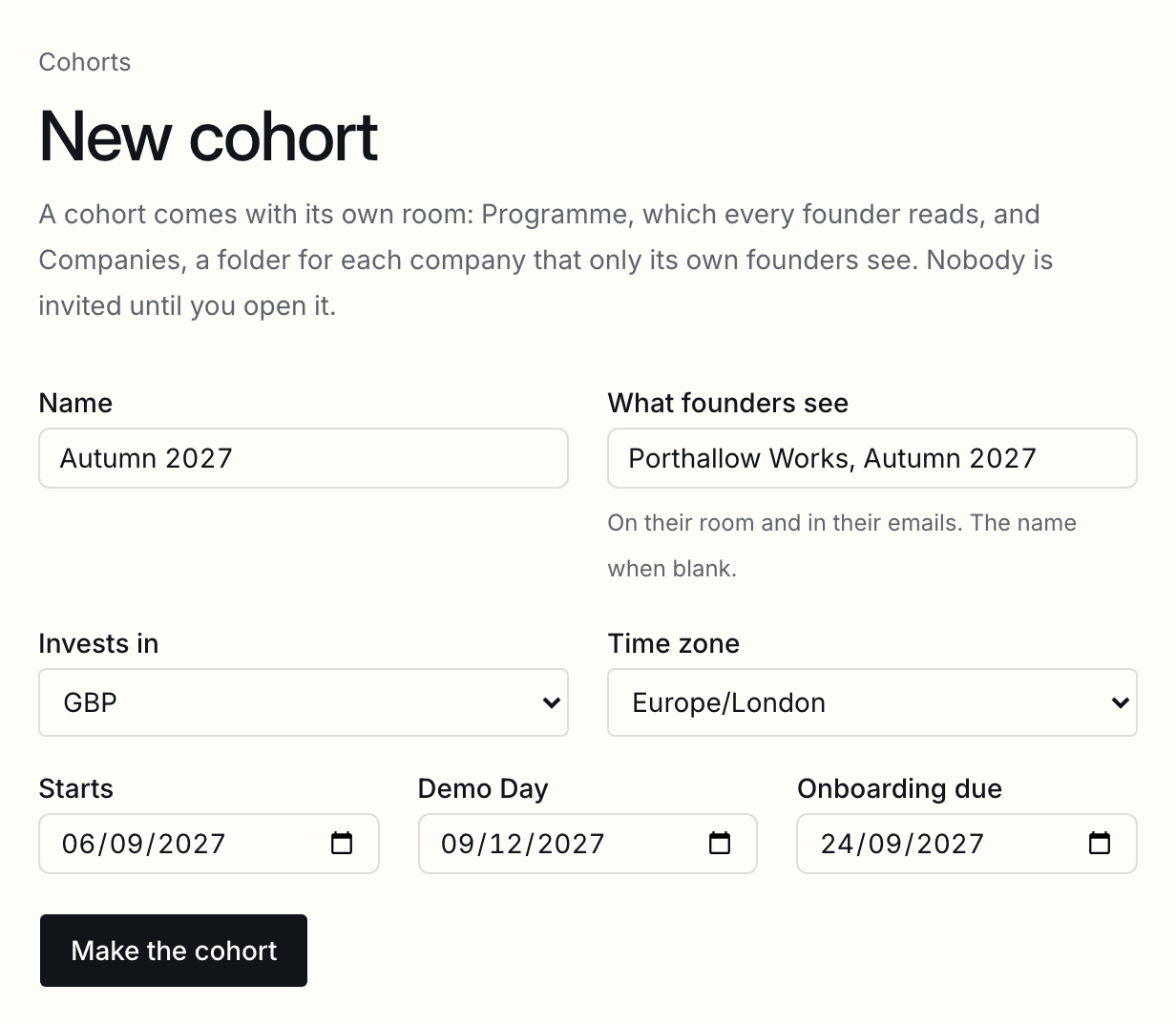
The room is made with it, with Programme and Companies. Put what every founder should read in Programme: the handbook, the calendar, the programme’s own terms.
Adding companies
A company's names, terms and founders, one of whom signs; the same company twice, and a founder in two.
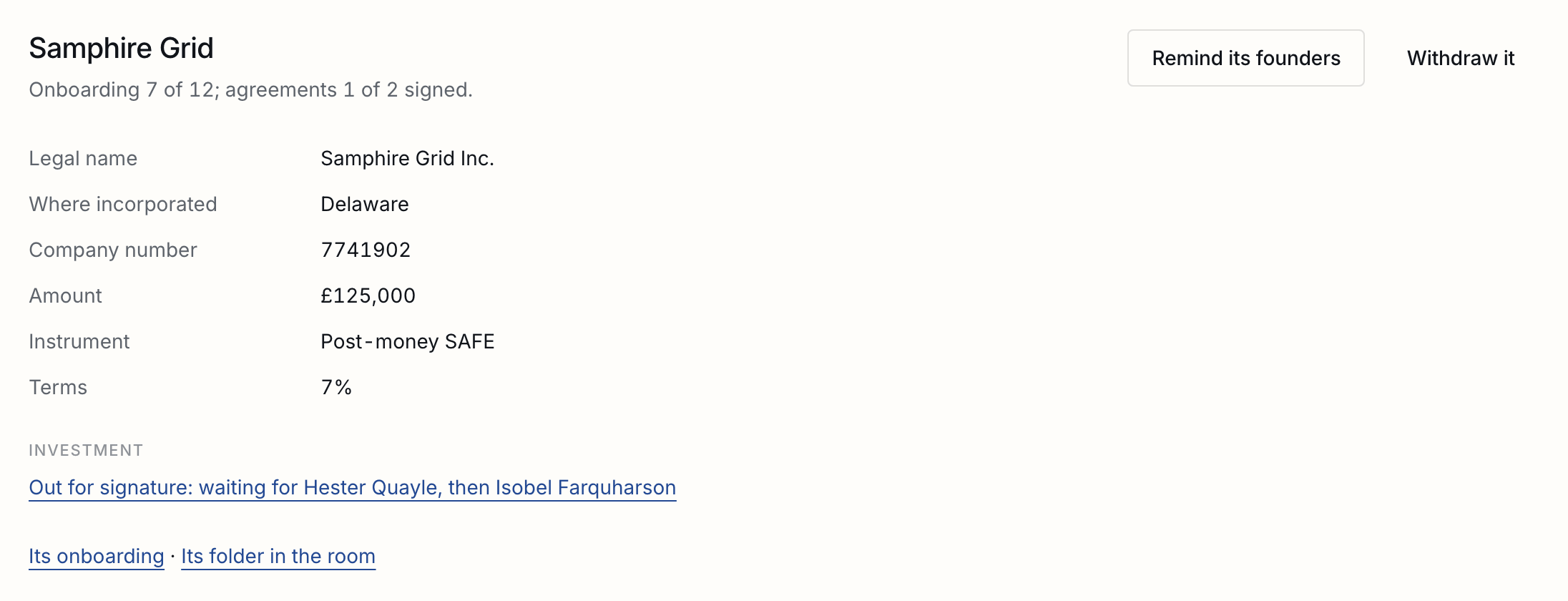
A company is its name as the programme calls it; its legal name, where it is incorporated and its number, once it has them; what you invest, on what, and on what terms; a programme fee, if one is taken from the investment; and its founders. The founder marked Signs for it signs for the company.
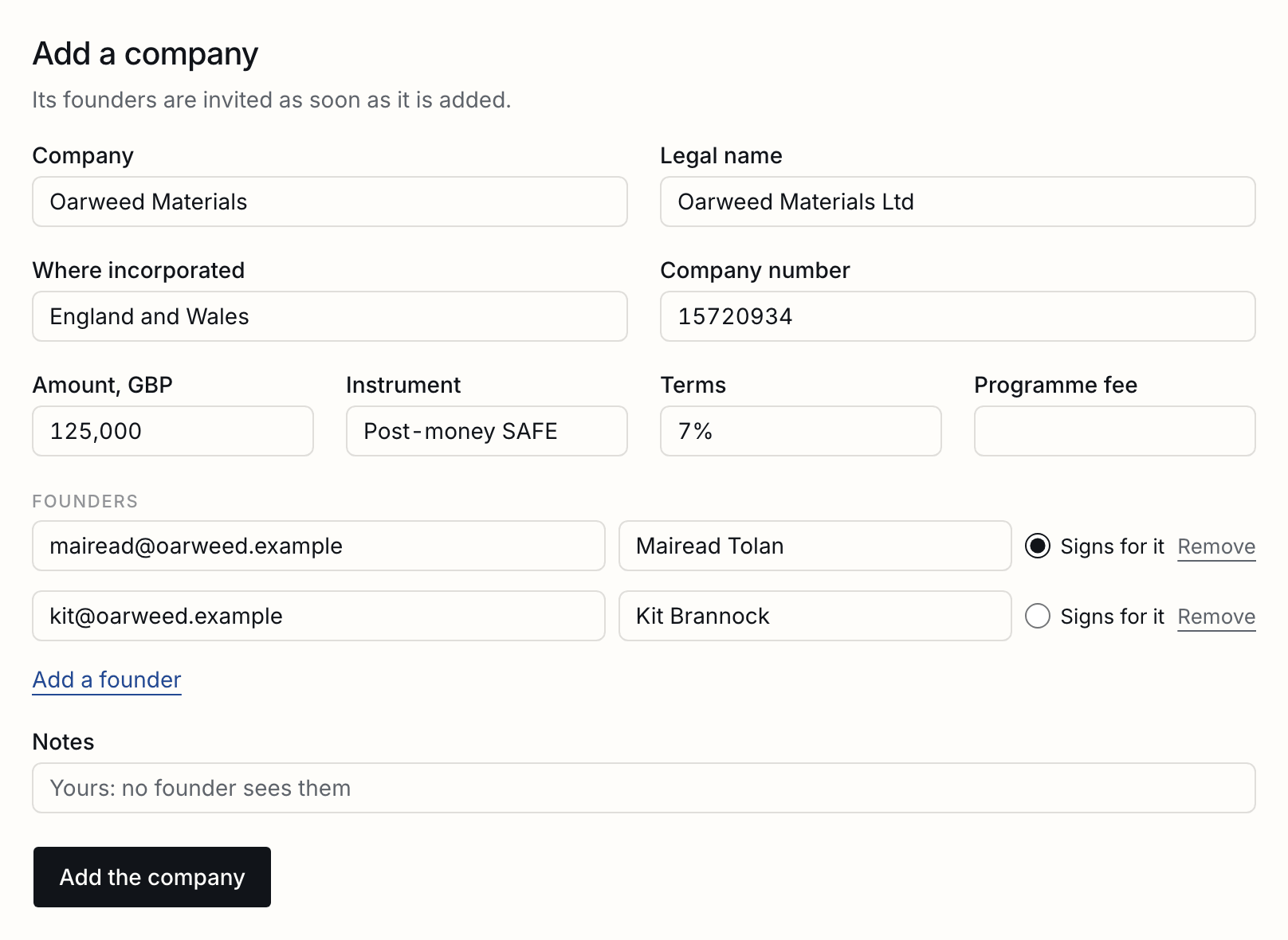
| The same company twice | Kittiwake Robotics and Kittiwake Robotics Ltd are named as one company when the second is added, and it is not added. |
|---|---|
| One founder in two companies | Refused unless you say why they are in both teams; the reason is kept. |
| Not incorporated yet | Leave the legal name blank. It reads as its name until it has one, and is asked for its certificate like every other company. |
| Notes | Yours. No founder sees them. |
From a spreadsheet
How each column would be read, shown and changed before anything is read in.
Under the register, choose the spreadsheet you keep your cohort in, as a CSV or an Excel file, one row a company. Before anything is read in, you see how each column would be read. Headings we know are read as themselves; one we do not, like Deal terms or Partner notes, is matched from its heading and the values under it and marked so. Change any column, or leave it out. Founders’ addresses and names go in one column each, separated by commas.
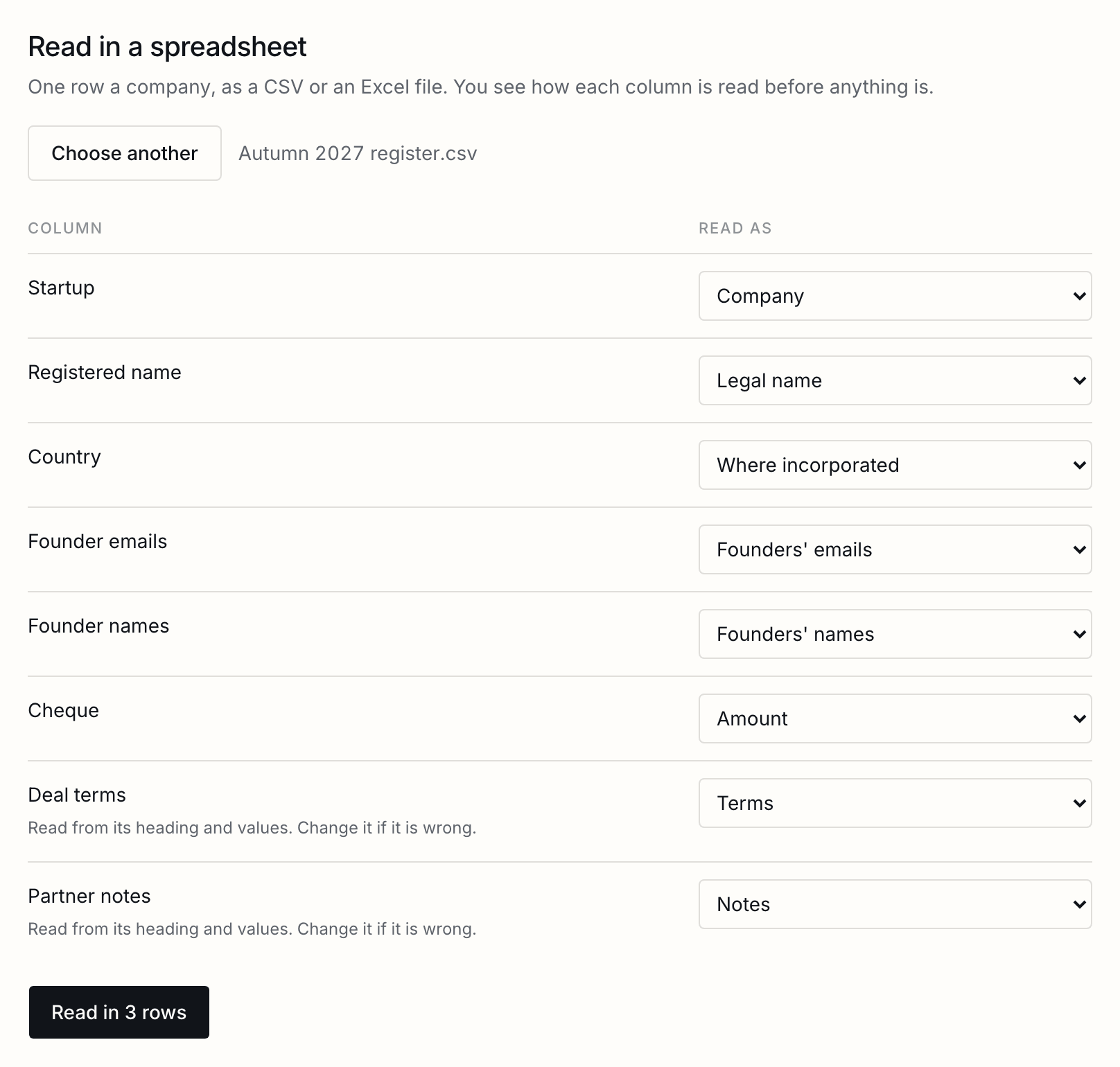
Read it in, and every row that can be read is added. A row that cannot, such as one naming a company already in the cohort, is left out with the reason, and the rest are added.
The register
Every company on one line with its terms, its onboarding and its signatures, and as a spreadsheet.
The register is the cohort’s first page: every company on one line with its founders, what you invest and on what, how far its onboarding has come, and how many of its founders have signed. Companies that withdrew are listed after, in grey.
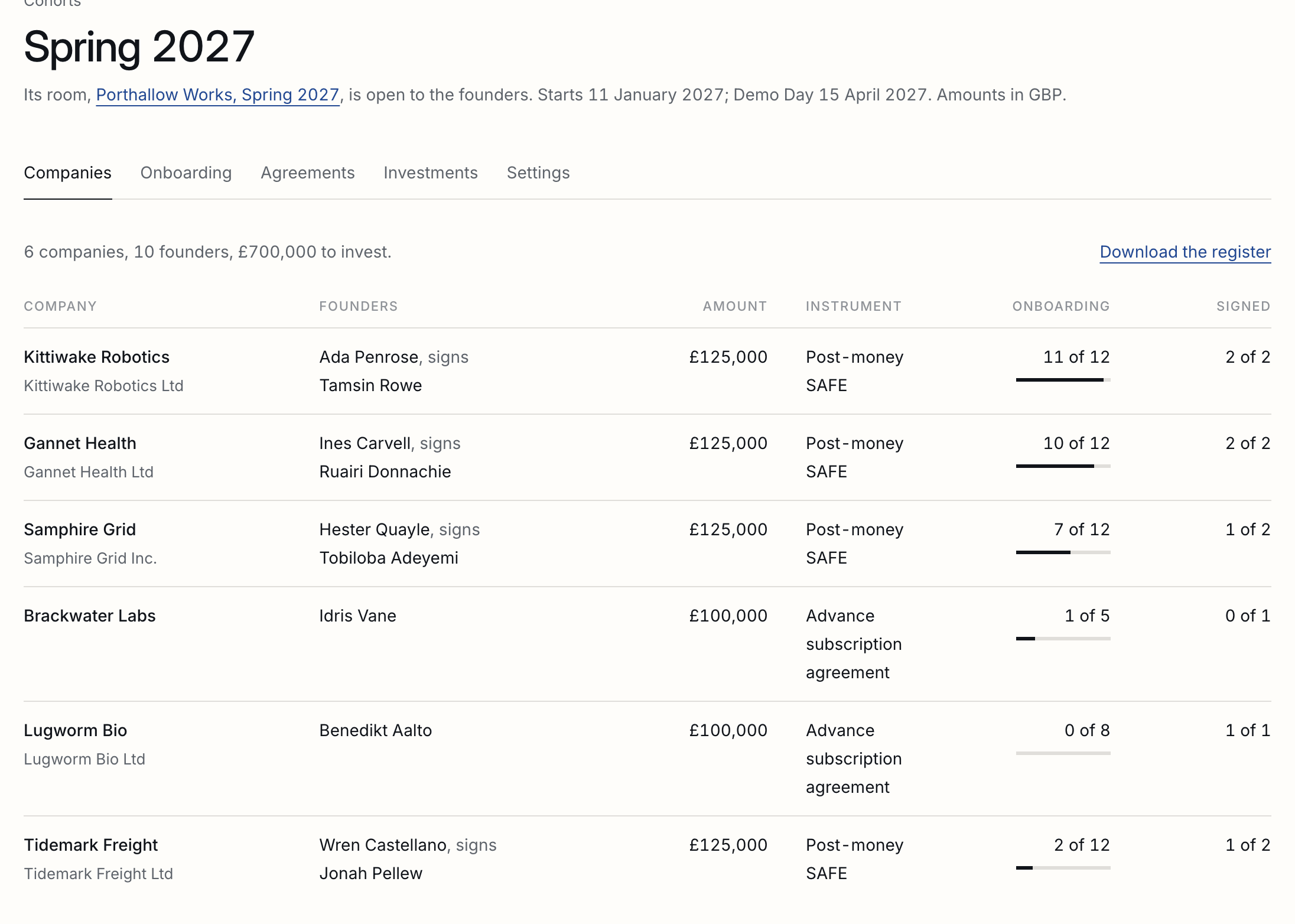
Each company has a page of its own: its terms, its founders, and changing any of it.
Opening it to the founders
Nothing is sent until you open it; then every founder is invited at once.
Nobody is sent anything while you set the cohort up. Press Open to founders, and every founder is invited to the room at once, each with a link of their own and a code to their address the first time they open it on a device. Every domain the room has not had before is named first, because a mistyped address is how the wrong person gets in. A company added after the cohort is open has its founders invited as soon as it is added.
What a founder sees
Everything they owe on one page, and several documents matched to their lines at once.
A founder’s room is Programme, their own company’s folder, and everything they owe the programme on one page: the agreements waiting for their signature, and the documents still to send, with the day they are due.
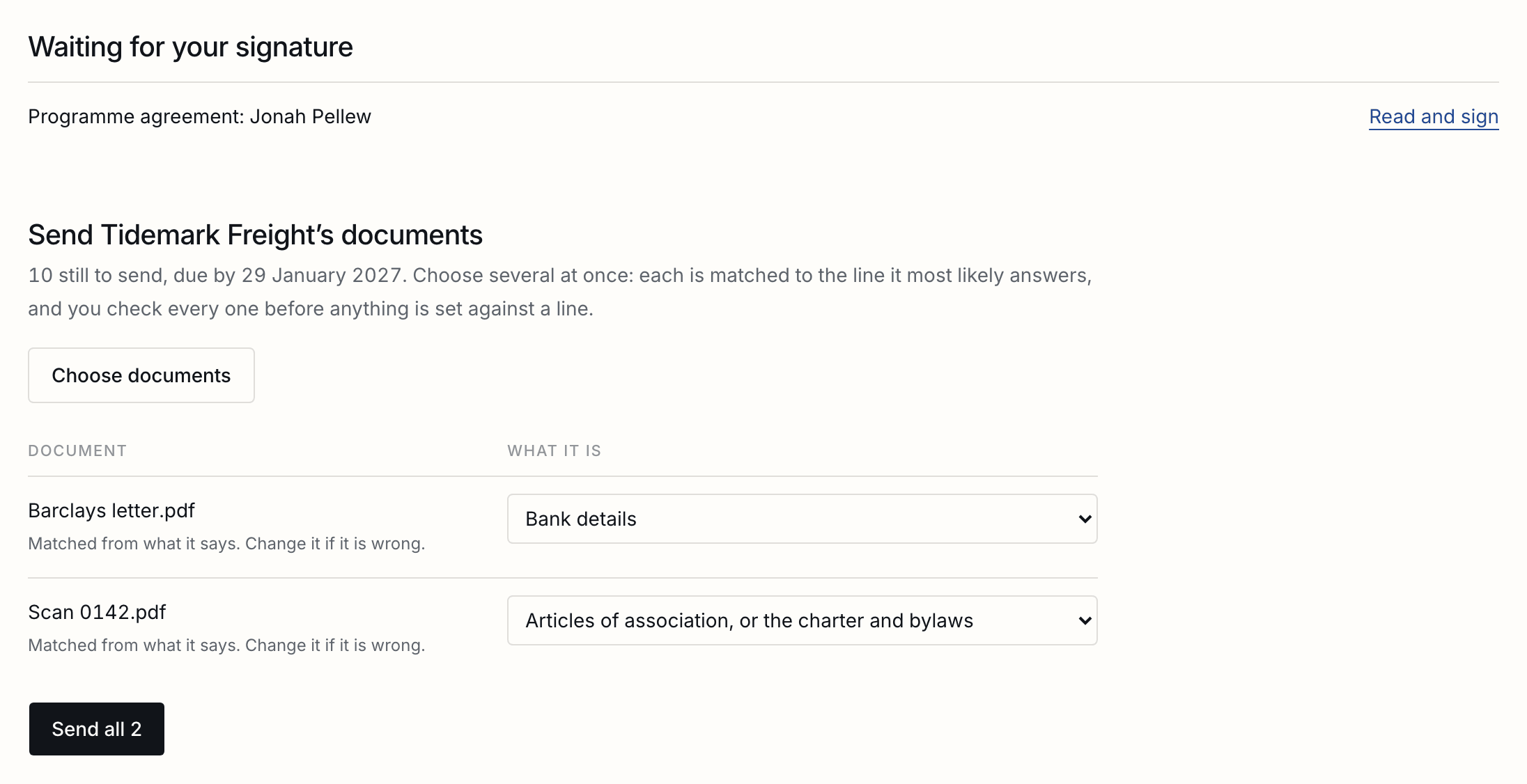
A founder can choose several documents at once. Each is matched to the line it most likely answers, from its name and what its first page says, and the founder checks every one, and changes any, before anything is sent. Nothing is set against a line without the founder saying so, and a file matched to nothing can be sent on its own.
The onboarding grid
Companies down the side, what is asked across the top, and where each thing is.
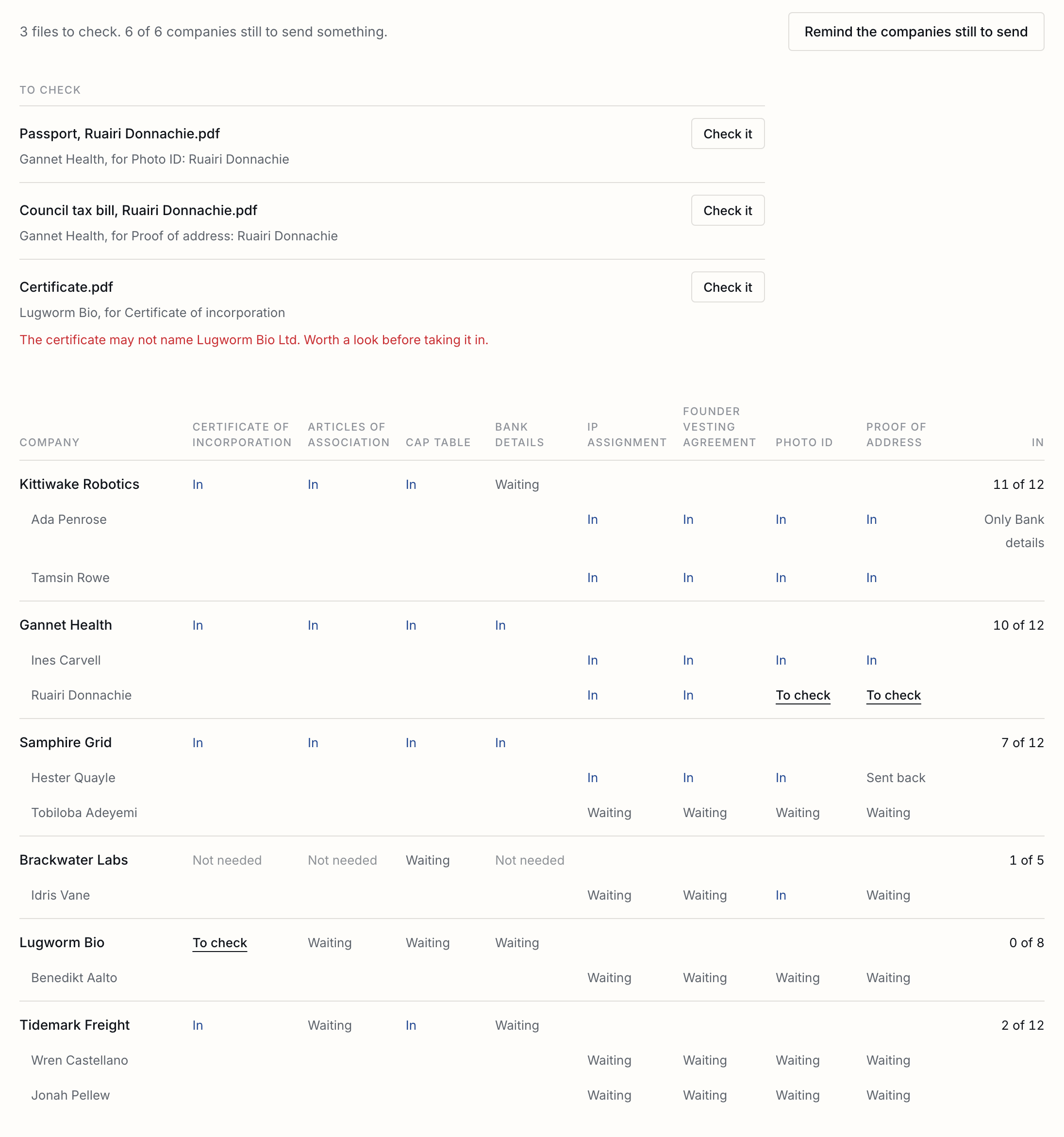
Onboarding shows every company in one grid: the companies down the side with each founder under their company, what is asked across the top, and in each cell where that one thing is. In, in blue, is taken in; To check waits for you; Sent back waits for another file; Waiting has had nothing yet; Not needed was marked so. The count on the right says how many are in, and names the last thing when only one is left.
Taking a file in, or sending it back
From the cell itself, with a reason the founder reads, and a certificate that may not name the company said so.
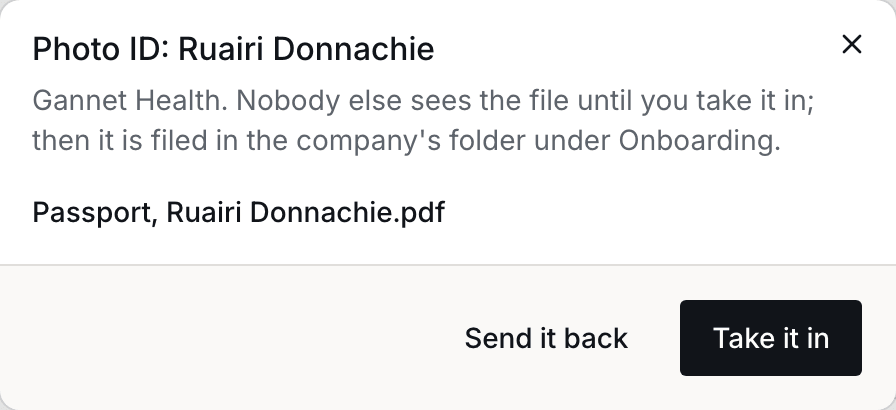
Files founders send wait outside the room, where nobody else can see them, until you take them in. The ones waiting are listed above the grid. A certificate of incorporation that may not name the company as it is registered is said so, for you to look at before taking it in.
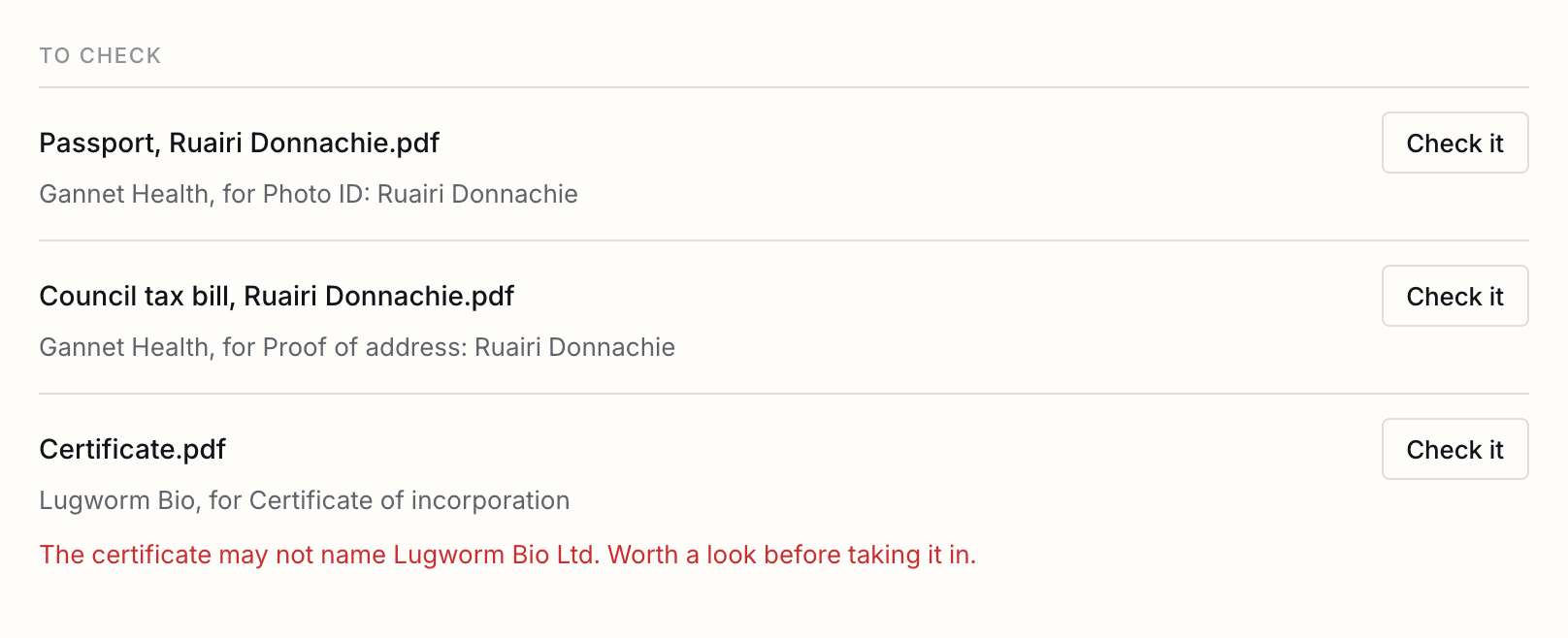
Press Check it, or the cell itself. Take it in, and it is filed in the company’s folder under Onboarding. Send it back with a reason, and the founder reads the reason and is asked again.
A line a company does not need, such as bank details before it is incorporated, is marked Not needed from its cell, with a reason that stays with it. Ask for it again from the same cell.
What every company is asked for
The usual list to start, lines for each founder, and changes that reach every company at once.
A cohort starts with what accelerators usually ask for at acceptance: the certificate of incorporation, the articles or charter, the cap table, bank details, and from each founder their IP assignment, vesting agreement, photo ID and proof of address. Change any of it under the grid. A line marked For each founder is asked of each founder separately, with their name on it.
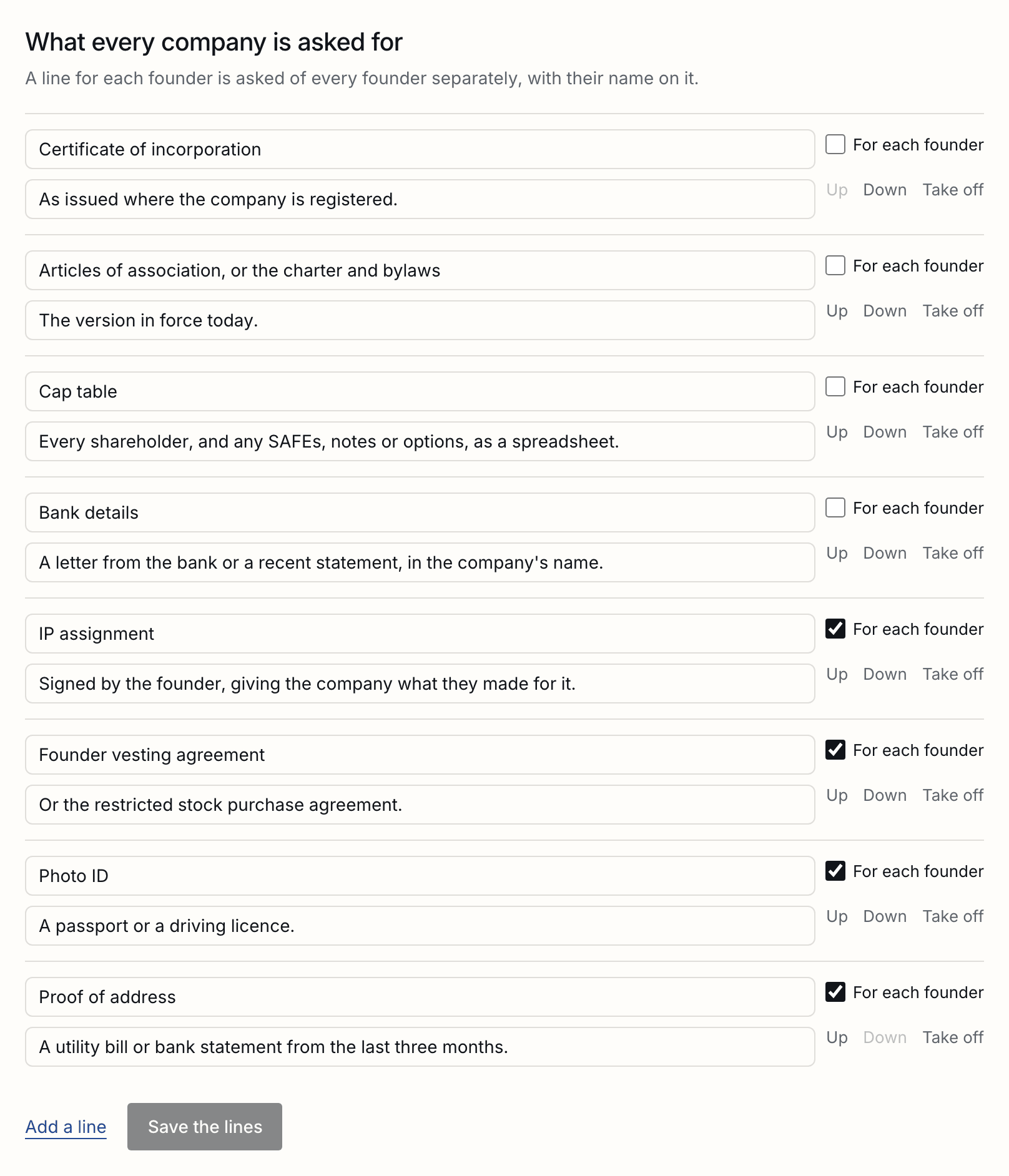
Saving reaches every company at once. A new line is asked of every company; a changed one changes wherever nothing has been sent for it yet; a line taken off comes off wherever nothing was sent, and stays wherever something was.
Reminding the companies
Each founder told only what is theirs, and nobody twice in a day.
Remind the companies still to send, on Onboarding, emails each founder what is still to come from their company and from them, and the agreements waiting for their signature, each with its own link. Nobody is told another founder’s lines. A company with nothing left to send or sign is not written to, and one reminded in the last day is left alone; you are told which. Remind one company from its own page.
The programme's agreements
One template, every founder their own copy with their company filled in, in one press.
Make the agreement one of your templates, with one signer left open for the founder. On Agreements, choose it and press Send to every founder. Each founder is sent their own copy: a field labelled Company is filled with their company’s legal name, or its name until it has one, and a field labelled Founder with theirs. Nobody is sent the same agreement twice.
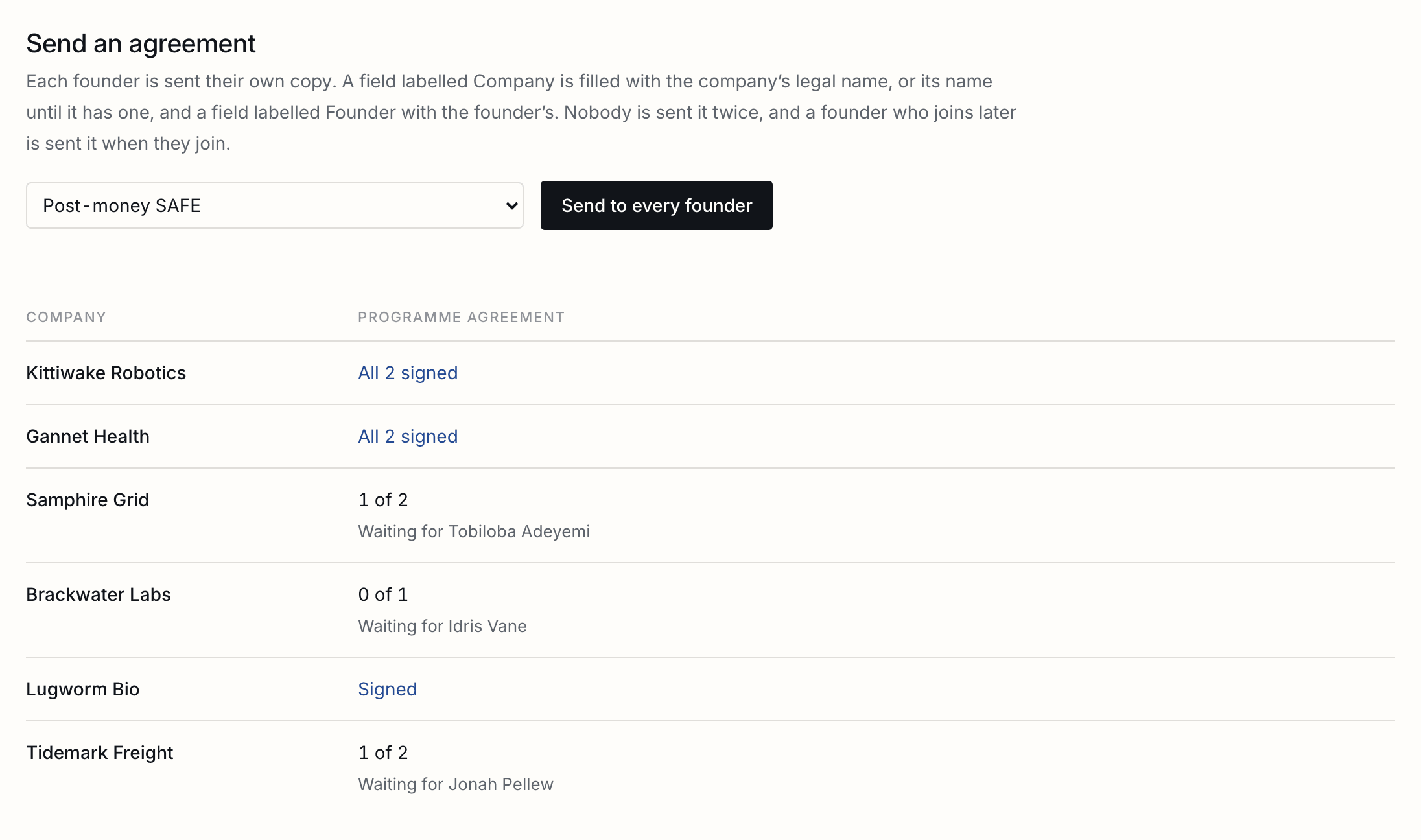
If your workspace asks for approval before sending, each copy waits for it and goes once it is approved.
Each company's investment
A closing per company from your own templates, filled from the register, its figures checked before sending, and released when its conditions are met.
Each company’s investment is a closing of its own: its documents, filled from the register, signed for the company and countersigned by you, and held until its conditions are met. Nothing is final until you release it, which is when you send the money. The Closings guide
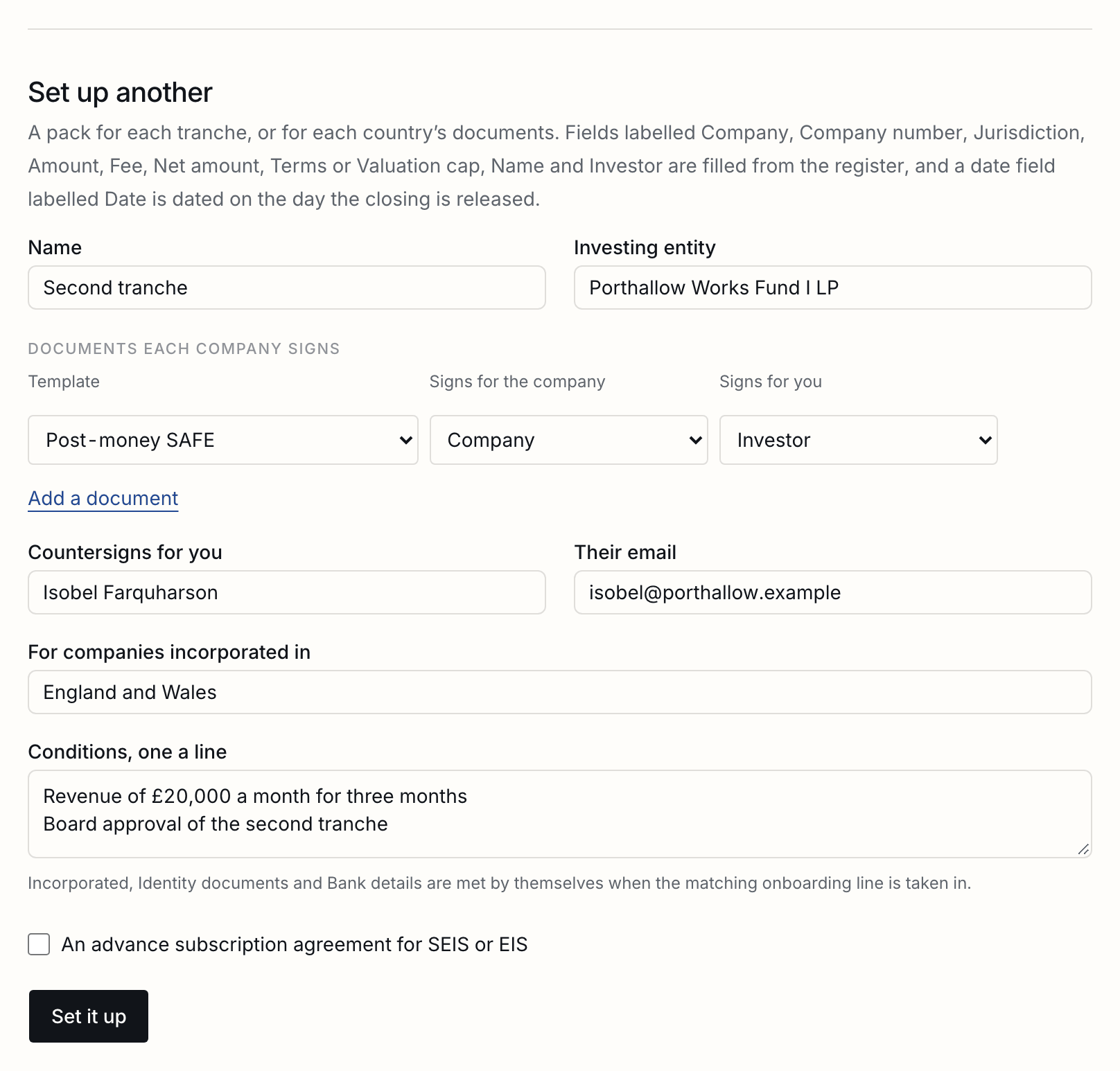
- On Investments, set up what you invest on: the templates each company signs, which role in each signs for the company and which for you, who countersigns, the investing entity, the conditions, and the companies it is for. A pack for each tranche, or for each country’s documents.
- Every company it is for is listed with the figures its documents would carry, and where its investment stands. A company not incorporated, or with nobody to sign for it, waits, with the reason. Check the figures reads each ready company’s documents as they would be filled and says whether they name that company and state its amount, and no other; a likely mismatch is said beside it, for you to look at.
- Press Send, and every ready company is sent its own closing at once. Each row then says who it is waiting for, how many conditions are met, and when it was released, and opens its closing.
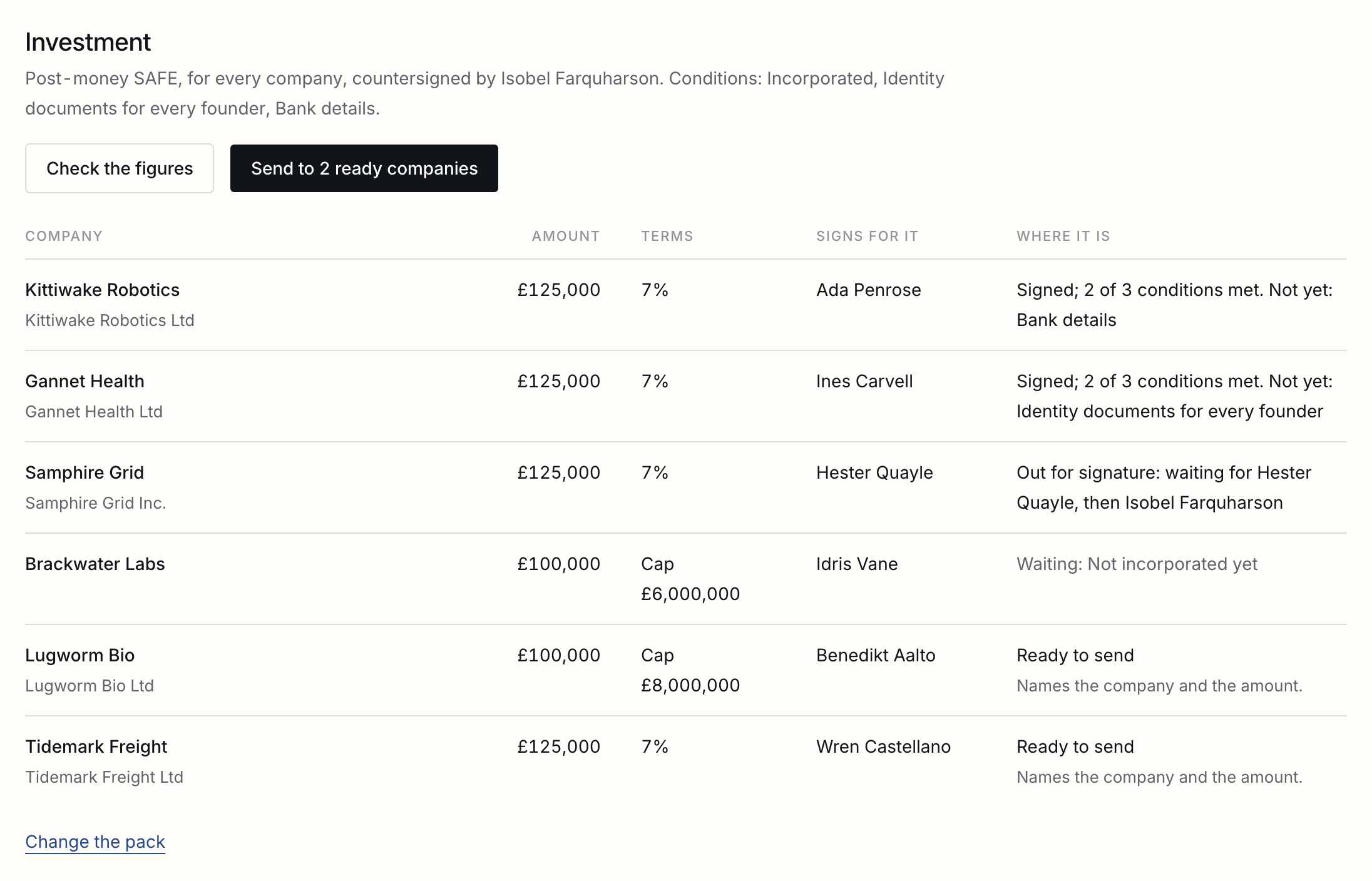
| Filled from the register | Fields labelled Company, Company number, Jurisdiction, Amount, Fee, Net amount, Terms or Valuation cap, Name and Investor. A date field labelled Date is dated on the day the closing is released. |
|---|---|
| Conditions met by themselves | Incorporated, Identity documents and Bank details are met when the matching onboarding line is taken in, with the file named. The rest you decide in the closing. |
| A figure changed after sending | The row says what changed. Send it again, and the old closing is called off, so no held signature is ever used, and a new one goes with the register as it is. |
| SEIS or EIS | An advance subscription agreement meant for SEIS or EIS needs its longstop date, and one more than six months away is refused. |
| A company that withdraws | Its investment stays as it is, for you to release or call off. Withdrawing never undoes a signature. |
Founders who join or leave
Invited and sent what the others were sent; or shut out, with what they signed kept.
| A founder joins | Add them on the company's page. They are invited to the room, sent every agreement the others were sent, and asked for their own lines. |
|---|---|
| A founder leaves | Take them off the company. They are shut out of the room at once, their unsigned agreements are voided, and their lines are marked as no longer needed. What they signed stays on the record. |
| The founder who signs leaves | The first founder left is marked as signing for the company. Change it on the company's page. |
A company that withdraws
Shut out with its unsigned agreements voided, its folder and record kept, and brought back if it returns.
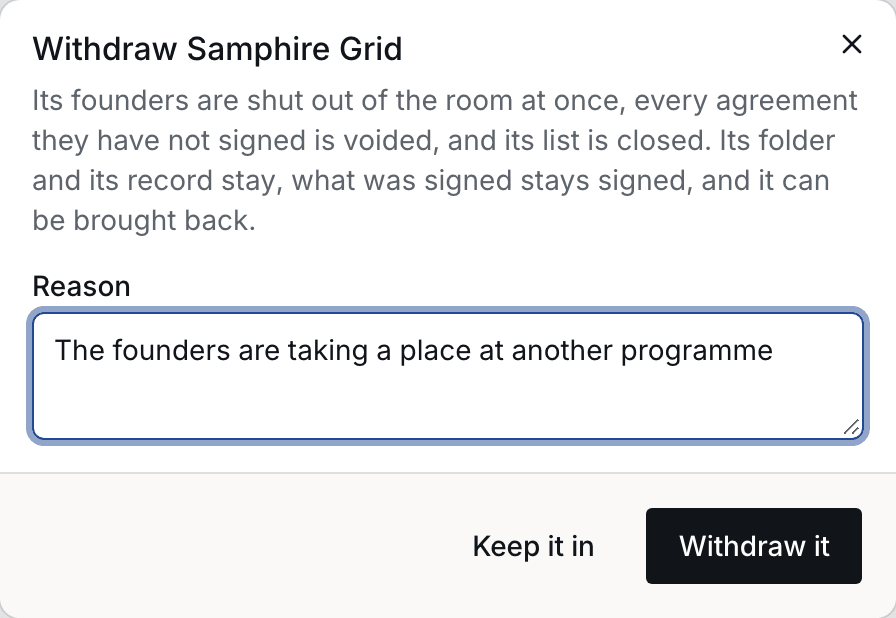
From its page, Withdraw it, with a reason. Its founders are shut out at once, every agreement they had not signed is voided, and its list is closed. Its folder, its files and its record stay, it stays on the register in grey with the reason, and its investment is left for you to release or call off: withdrawing undoes no signature. Bring it back from the same page: its founders are let in again and sent afresh what was voided.
Ending the cohort
Nothing more asked or sent, and nothing signed touched.
When the programme is over, End the cohort in its Settings. Nothing more is asked or sent from it, and it can no longer be changed. Everything signed stays signed, and the room stays as it is for everyone in it; close the room itself when they should stop reading it.
Good to know
The due day, who sees what a founder sends, files with something hidden, and the room's lists.
| The due day | Every founder sees it above what they still have to send, and in their reminders. Change it in Settings, and every company's list moves with it. |
|---|---|
| What a founder sends | Reaches the programme and nobody else. Another company's founders never see it, even once it is taken in. |
| A file with something hidden in it | Is said so before you take it in, as in any room: take it in flattened, or as it is. |
| The room's lists | A room's allow and block lists apply to every founder invited, as they do in any room. |
Tell us what you were trying to do and we will fix the page. Write from the support page.
Last changed 24 September 2026.