Sending and signing order
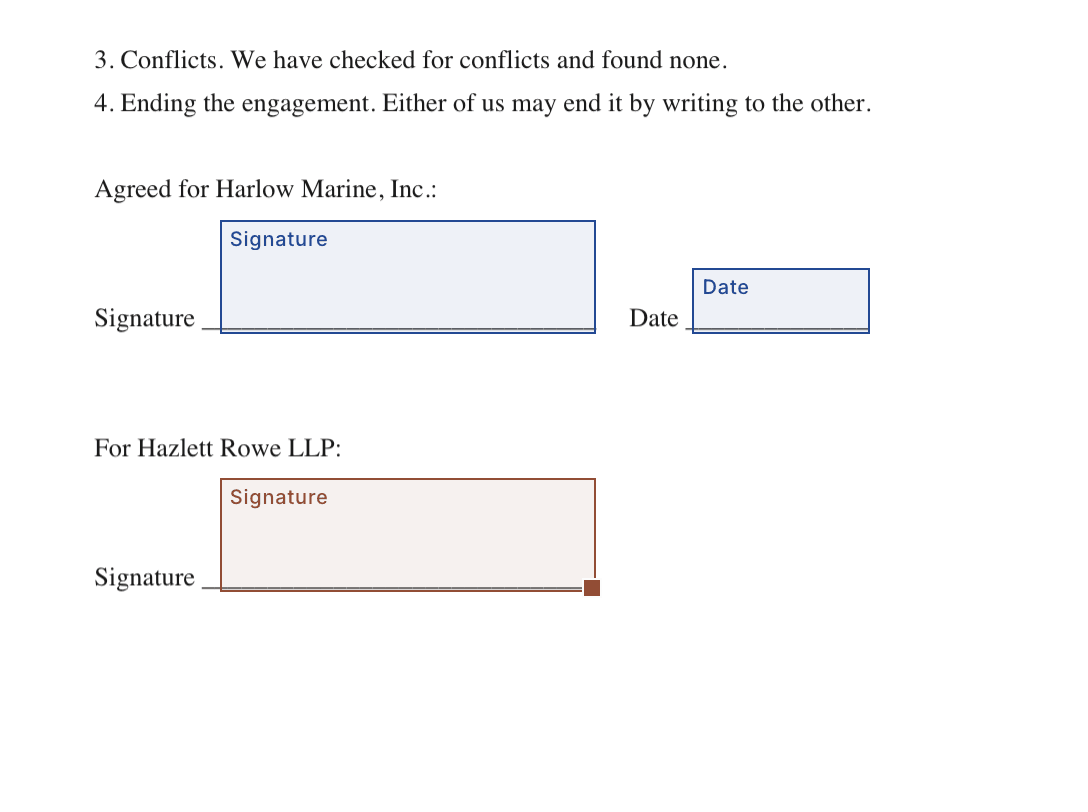
A document goes out once, to everyone at the right moment, and comes back signed with its evidence attached. This page is the whole of that path. Every picture on this page is of an example letter from Hazlett Rowe LLP to a client, whose names are made up.
Browse guides
On this page
What a document is
The files you can upload, how several become one run of pages, and the seven things a person can be asked to fill.
A document is one or more files read as a single run of pages, plus the people it goes to and the fields they fill. Upload a PDF, a photo or scan (JPEG, PNG, WebP, TIFF, HEIC, GIF), or a Word, OpenDocument, RTF, text or HTML file; anything that is not a PDF is turned into one on upload, before you place a field, so you approve exactly what the signer will see. A contract and its schedules can be one document of several files: the signer sees one continuous document, and the certificate names every original.
Need a starting point? From Documents, choose New document, then From template. If you have no saved templates, Browse free Word templates (US) opens the existing forms in a new tab. Download and adapt a form, save it as a PDF, then return to Upload. The document dialog keeps your selected files and title while you browse.
| Files in a document | Up to 10 |
|---|---|
| Size | 25 MB a file, 50 MB in all, 500 pages |
| Recipients | No limit. One person per email address on a document. |
| Fields | Signature, initials, date, text, number, checkbox, dropdown. Each belongs to one signer and is required unless you say otherwise. |
| Scanned on the way in | Every file is scanned for viruses as it comes in: a Word file or a photo as you chose it, and the PDF it becomes. One a scanner names is refused, and nothing is made from it. The same holds for a template and for a new version of a sent document. |
If the sign-in check does not finish
Upload checks your sign-in before sending a file. If that check does not finish, the dialog keeps your selected files and title so you can choose Upload again. If your sign-in cannot be confirmed, you can retry or sign in again. The file has not been uploaded at that step.
Cancelling during the sign-in check closes the dialog and stops that waiting upload. A late answer to the cancelled check does not create a document.
If another tab changes your workspace
An upload belongs to the account and workspace where you started it. If another tab changes either, ShareSign checks again before uploading files and before creating the document. It does not create the document in the newly selected workspace.
Return to the account and workspace where you started, then retry. To use a different workspace, reload Documents there and choose your files again. Files already uploaded stay with their original workspace.
The editor reads the document’s own text and suggests fields where it finds a place to sign, a date line or a name line; clicking a suggestion makes it a field. A field is placed as a fraction of its page, so it lands in the same spot whatever the page size, rotation or crop.
Editing an unsent packet
Add, remove, reorder or replace packet files, preserve retained fields and review encrypted device recovery of unfinished changes.
On every plan, Documents in this packet lists each file, its page count and its place in the packet. Select a filename to jump to it. Open its Actions to move it up or down, remove it or choose a replacement. Add document lets you review another PDF, Word file, photo or scan before adding it.
Your people, signing settings and fields on the other documents stay in place. Removing a document shows how many of its fields will leave the packet. Replacing one opens the current and new pages for review, then asks you to confirm that you will place the replacement’s fields again.
Undo last packet change restores the previous documents and their fields until your next saved edit. Keep at least one document in the packet. Once it has been sent or put up for approval, its packet cannot be edited here.
Recover unsaved changes
On every plan, the document editor keeps an encrypted recovery copy on this device when changes are still pending. Wait for Recovery copy kept on this device before closing an interrupted editor. Saved confirms that completed details are stored in ShareSign; unfinished recipient details remain on this device until you finish them. A device recovery copy is separate.
Reopen the same draft while signed in to the same account and business. Choose Review recovered changes, compare the current draft and the recovered people, fields and settings, then restore or discard the copy. If the saved draft has changed, download the recovered changes to compare with the current version.
Copies expire after 24 hours. Saving all your changes, signing out or changing business clears the relevant copies. Up to 20 unfinished editing windows can have a copy on this device. Expired encrypted copies are removed when you next use ShareSign. If your browser cannot keep a copy, the editor tells you and offers a download. Keep that editor open until you have saved or downloaded your changes.
Fields a signer fills in
Place signatures, initials, dates, text, numbers, checkboxes and dropdowns. Use optional alignment guides and precise position controls.
Choose the signer, then drag a field onto the page, or click the field type and then its place on the page. All seven types can be placed either way. Select an existing field and press Command-D on a Mac or Control-D on Windows to duplicate it; the arrow keys move the selected field. Saved fields keep their type and position when you reopen the draft.
Show alignment guides displays matching field edges and centres, and the page centre, when you select, move or resize a field. Turn it off in Fields whenever you prefer. The guides leave positions unchanged; arrow keys, Position and size, and Undo remain available.
| Signature and initials | Drawn or typed by the signer, and only by them. Each can say in what capacity, such as for Ambler Millwork, Inc. or personally: the signer sees it at the field and when they sign there, and the certificate lists it under them. |
|---|---|
| Date | The day they sign, filled in with one press. |
| Text | A name, a reference, a line of words. |
| Number | Digits, with commas where thousands fall and one point for decimals: 12,500 or 0.25. Anything else keeps Finish from working and says why. |
| Checkbox | Ticked or not. |
| Dropdown | One of the choices you write, one a line, from 2 to 50 of up to 120 characters each. The signer picks one and cannot type their own. |
A dropdown with fewer than two choices cannot be sent; the review step names the one that needs them. In a template, a number or a dropdown can carry a default the signer sees already filled in, and can change.
Choose where to start
Four optional first tasks, links to unfinished work and access offers kept separate from setup.
First, enter your name. You choose your signature when signing. For an agreement or private room, Free preparation stays available; review Pro for reusable templates, unlimited documents, or an NDA before room entry. Return from plan review to the same task and selected signing template.
When you start from a free agreement template, ShareSign keeps that template beside your first signing task through sign-in and workspace selection. Download and edit its Word copy, then upload the agreement you have reviewed. The link at the end of the Word document returns to that task. The mortgage documents checklist opens private-room preparation; the closing checklist and closing guides open closing preparation, with its Business requirement shown before you begin. The Word checklists stay free to download.
Starting from the fund-manager, M&A-adviser, accelerator or law-firm page keeps fund, deal, cohort or client-link preparation through sign-in and business selection. Commercial real-estate sales use deal preparation. These tasks come with Business; an owner can review the plan, ask a colleague to pay for a first subscription, and return to the selected task. Checkout keeps the original business and task while payment confirmation is pending. Review its status before paying again.
Fund, deal and cohort preparation opens a form to review before creating the private room. Add investors, buyers or companies afterwards. Client links need an engagement-letter template with one available client signer and fields, with other signers pinned to the firm. Follow the template guidance if the letter is not ready; review retainer and matter-room settings before saving the link.
Choose Get something signed, Share documents, Organise my company or Explore first. Setup is optional: Skip for now leaves your workspace as it is. You can return from an empty Documents page or Settings, Features. Your current workspace is shown above the choices; its menu lets you choose another or create one.
Signing opens the New document form. Sharing opens an empty room form: it does not make a room until you confirm. Organisation opens workspace settings. Owners and admins can also choose which features appear, under the optional section. No task requires fundraising, a funding round or a cap table.
If you have an unfinished draft or private room, a link returns to your own latest one. The page shows documents already sent and rooms already open. Read-only access is explained beside the choices, and existing records remain available according to your permissions and plan.
An access code is separate from setup. Follow the offer link and deliberately choose the workspace to receive it. Choosing or skipping a task does not redeem a code, extend a benefit or give the partner access to your documents.
Try it first
Sign a real document addressed to you in under a minute, without emailing anybody or using up your plan.
An empty workspace offers a sample: one page addressed to you, with its fields already placed, sent to you alone. You sign it on your own signing page and get back a completed PDF with its certificate, which is the whole product in under a minute. It emails nobody and does not count against your plan.
Before you have a workspace at all, sharesign.co/try does the same with no account and no email address: type your name, sign the sample on the real signing page, and download the signed PDF with its certificate. It is removed 24 hours after it is made.
A SAFE from Y Combinator
Y Combinator's post-money SAFE and pro rata side letter, word for word, with your terms in the blanks and the signature lines placed.
New document, From template, then SAFE, from Y Combinator. Pick the valuation cap, discount or most favored nation form, and add the pro rata side letter if the investor has one. Fill in the purchase amount, the cap or the discount, the date, the company’s legal name and state, who signs for it, and the investor. The form’s own opening lines fill in beside you as you type.
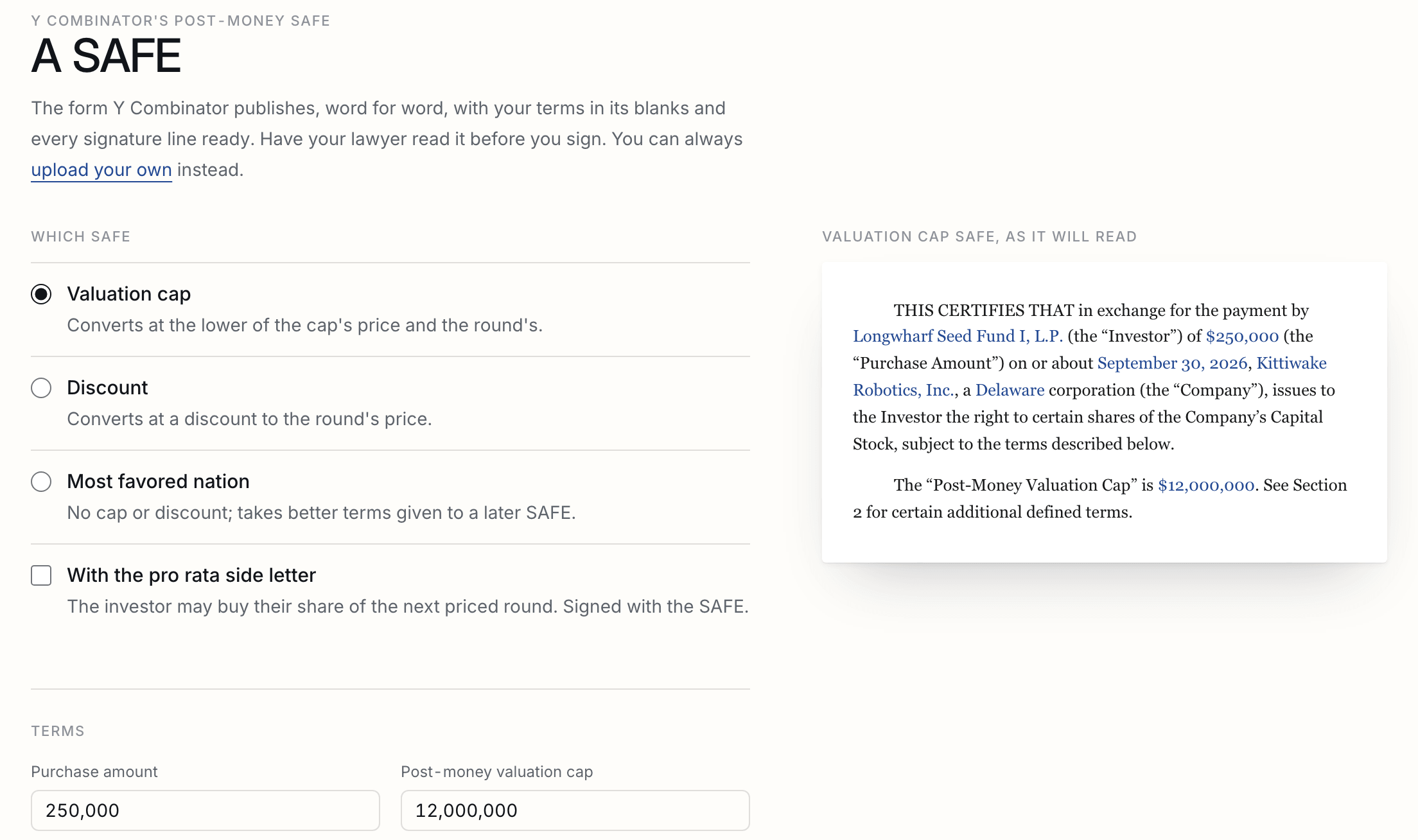
The document is Y Combinator’s form word for word, with your terms in its blanks, its version and licence on the first page, and a field on every signature line: the company’s signature, and the investor’s signature, name, title, address and email. The company signs first and the investor is emailed when it has. Open it in the editor to change anything before it goes, or upload your own SAFE instead.
| Forms | Post-money SAFE, version 1.2: valuation cap, discount, and MFN. Pro rata side letter, version 1.0. |
|---|---|
| A discount | Type the discount (20) and the form gets its Discount Rate (80%). |
| Amounts | 250,000, $250,000 and 250k all mean the same. Cents are kept. |
| Names | Written in the letters the form is printed in, as on the company's filings. |
| Plans | Every plan. Sending it counts as one document. |
Signing order
Order numbers decide who is emailed when, and a signer who is not yet due sees nothing at all.
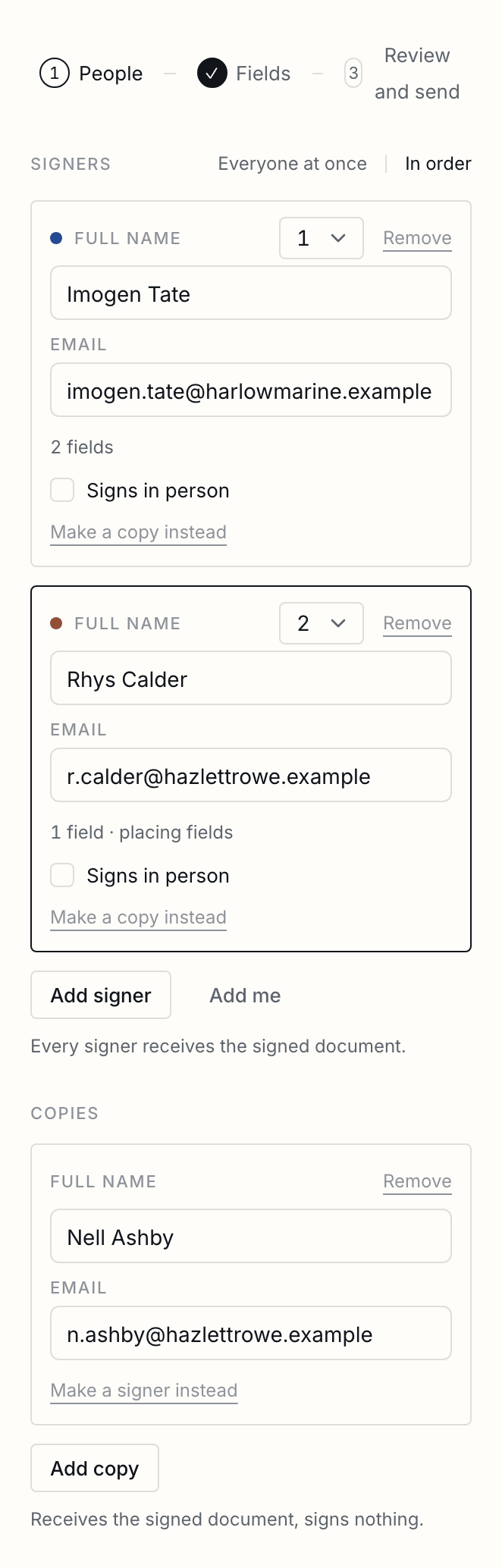
Every signer has an order number. Signers with the same number are emailed at the same time; the next number is emailed only when everyone before it has signed. Leave every signer at 1 and they all sign at once. People who receive a copy are told when the document is sent and again when it is complete, whatever the order. A signer who is not yet due sees nothing until their turn: no email, no link.
What the signer sees
Review the PDF and its page text, complete required or optional answers, correct dates and marks, and deliberately confirm a signature without an account.
An email from you, through ShareSign, with your message and one link. The link opens the document in the browser with no account, download or app. Their fields are marked; they draw or type a signature, and a signer who is signed in to a ShareSign account under that email is offered the signature they saved there. Before anything is recorded they confirm, in a sentence they can read, that the electronic signature has the effect of a handwritten one, and they are told what is recorded to prove it.
On phones, text, number and choice fields expand while you edit them, then return to the paper view when you leave the field. Read document text opens the text supplied by each PDF page alongside the signing controls. Choose a page and read or select its text without filling a field. Images and page layout may be missing from that text, so review the page as well. A page without readable text says so and offers the original PDF.
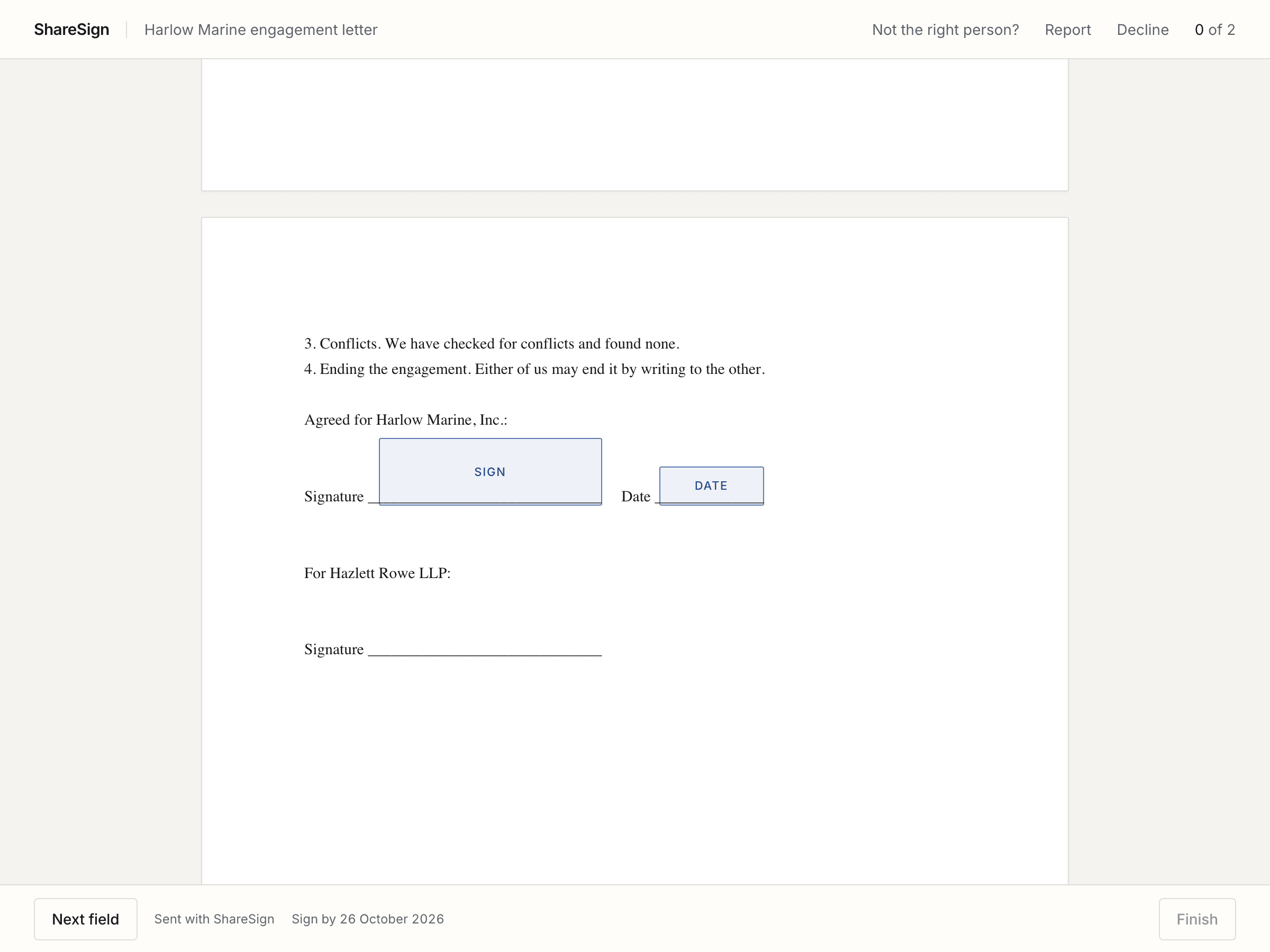
Typed, chosen and ticked answers are saved as they go. The page says when those answers are saved, still saving, or need another attempt. Confirmed saved answers return on the same valid link, on any device. If two windows change an answer, the signer sees both answers and chooses which to keep. Until they sign it is theirs alone: you, the other signers, copies and the API do not see it. If the link passes to somebody else, by a hand-off or a corrected address, it is cleared. Signatures and initials are kept only when they finish.
The remaining required fields are counted above the document. Next field reaches the first unfinished answer in page order and focuses it for typing or keyboard use. Finish becomes available when the required answers are ready. If the final response is interrupted, Check signing status checks whether the signature was received. A receipt distinguishes waiting for other signatures, preparing the completed copy, and a signature held for a closing.
A signer can also decline with a reason, pass the document to the person who should really sign it if you allow that, or report it if it looks like fraud. What each of those does is on copies, hand-offs and declines.
Signing in person
Somebody in the room signs on your device, locked to your account until you unlock it, or on their own phone from a code.
Somebody in the room with you can sign without an email. Tick Signs in person beside them when you add them; their email becomes optional, and nothing is ever sent to them. When it is their turn, open the document and press Sign in person. If they are next the moment you send, it opens by itself.
| On your device | They sign on your laptop or tablet. From the moment you hand it over, nothing of your account opens on it: every page goes back to their signing. To have it back, you unlock it with your password or a code sent to your email. |
|---|---|
| On their phone | You show a code and they scan it. It opens on the first phone that presses Continue and on no other, so a photo of the code opens nothing. Your screen shows when it is open and when they have signed. |
| Before they sign | They see their name as you typed it and can correct it, and can give an email for their copy. A corrected name is recorded with both spellings. |
| Their copy | With an email, it arrives when everybody has signed. Without one, it is theirs on the spot: a download on their phone, or a code on your screen that they scan, which works for a day. |
| The certificate | Says it was signed in person and who was there, on whose device. On your device the network address is yours, and the certificate says why. |
| Somebody you emailed turns up | Press Sign in person beside them instead. The link they were emailed stops working, and they are not reminded again. To send them a link after all, change their email address on the document. |
| Card payments | Somebody who pays by card as they sign signs on their own phone, never on your device. |
Reminders
Pick the days signers are chased, change them while the document is out, and see when the next one goes.
You choose when signers are reminded, in the last step before sending: after 3 days and again after 7 (the default), every 2 days, every 3 days, every week, or never. The API takes any list of up to ten days. While the document is out for signature you can change it from the document page, which also says when the next reminder goes.
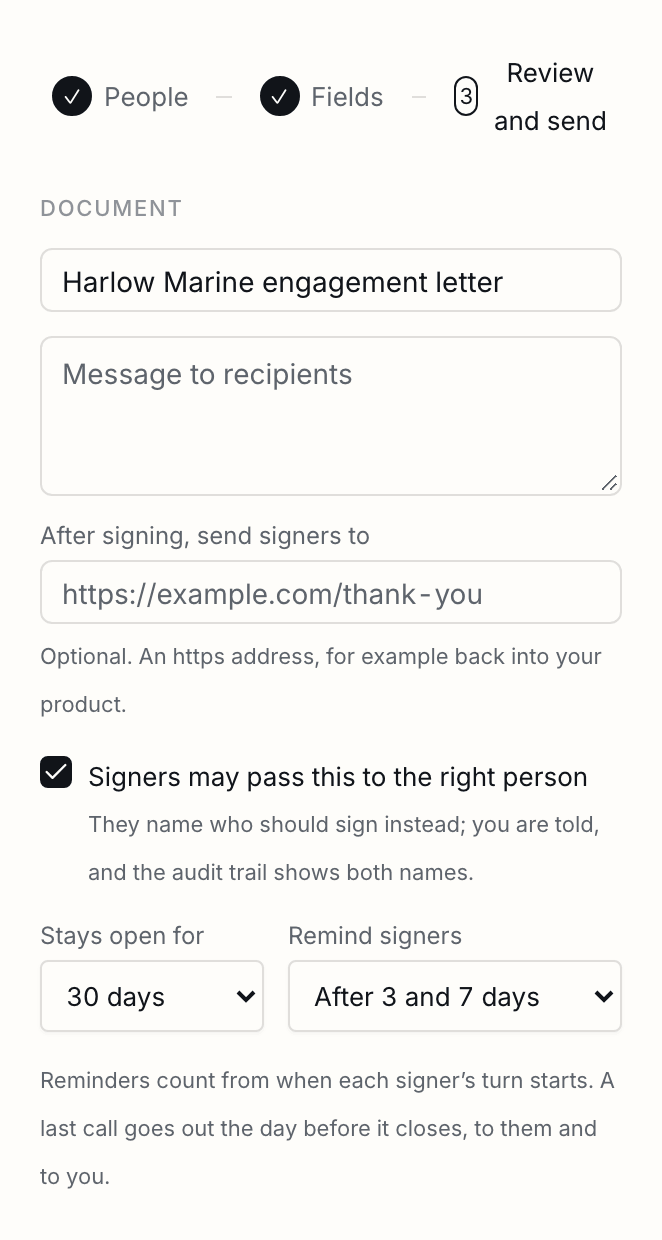
| When the clock starts | When each signer's turn starts, not when the document was sent. The second signer of a document that sat with the first for a week gets their first reminder three days after it reaches them. |
|---|---|
| Who is reminded | Only a signer whose turn it is and who has not signed. A reminder is a fresh copy of the signing email, and the trail records it. |
| Never twice in a day | Schedules, a last call and a reopening can land close together. Nobody hears from us twice within 20 hours. |
| Changing it after sending | Change, beside the reminders on the document page. The new days count from when each signer's turn began, as the first ones did, and days already past are skipped rather than sent late. Choosing never stops the reminders; the last call still goes the day before it closes. |
| From code | One API call gives a sent document new reminder days, under the same rules, with a key that is allowed to send: { "reminder_days": [2, 4, 6] }, []for none, or nullfor the usual 3 and 7. |
| Sending a link again | From the document page, for any signer who is still waiting. The old link stops working and a new one is emailed, so a forwarded or leaked link cannot be used later. |
The deadline
How long a document stays open, where signers are told the date, and how to move it or reopen an expired one.
A document stays open for 30 days unless you choose 7, 14, 60 or 90; the API takes anything from 1 to 365. Signers are told the date in their email and on the signing page, so nobody has to guess how long they have.
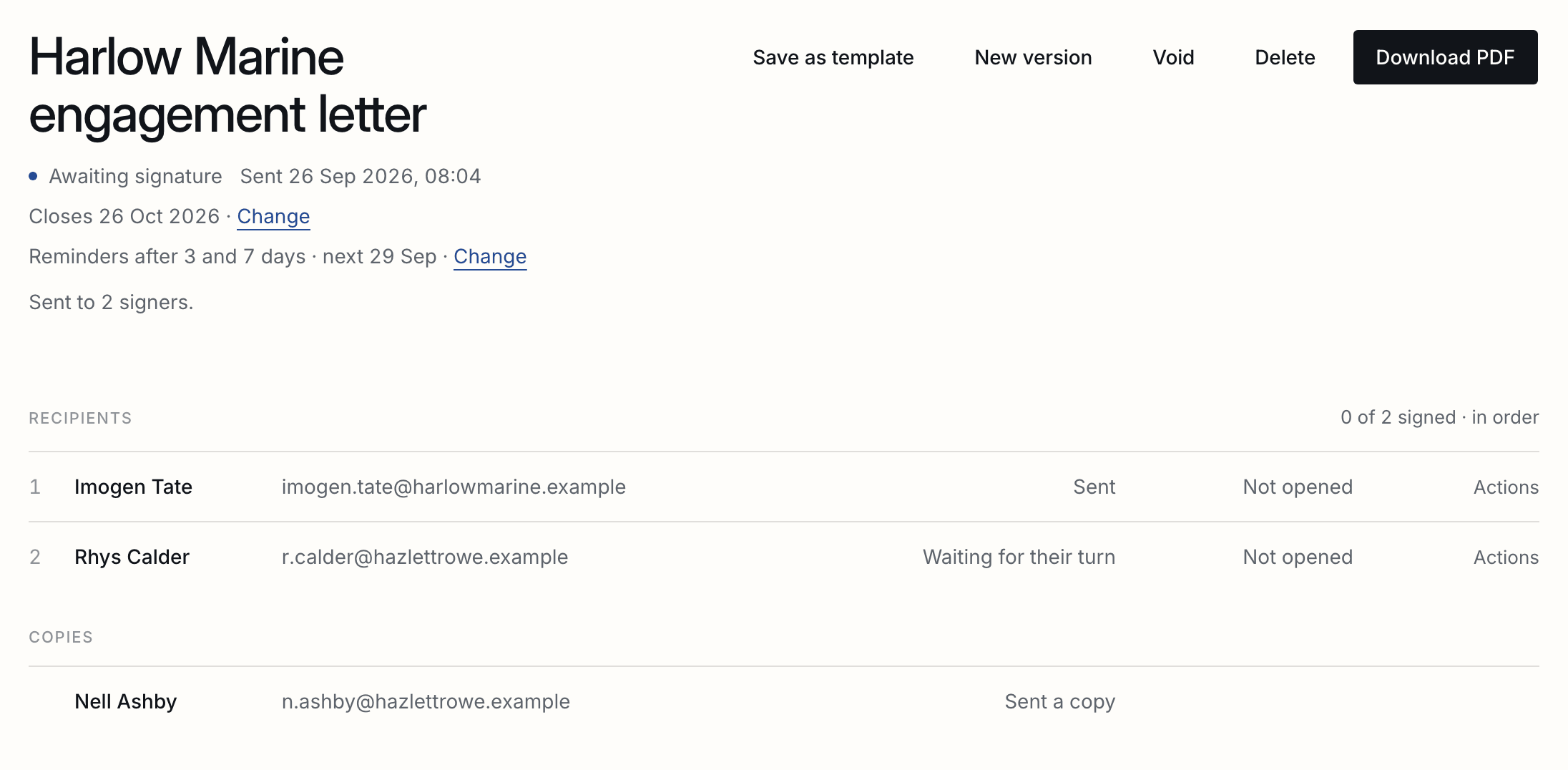
| The last call | A day before it closes, whoever is still waiting is reminded once more, and you are told who has and has not signed, in time to do something about it. |
|---|---|
| Moving it | From the document page, at any time while it is out for signature: a week, two weeks, a month, or a date you pick, up to a year from sending. The same links keep working, and the reminders follow the new date: every 2 days runs on to it, and reminders the old date cut off come back. |
| Reopening | A document that expired can be opened again the same way. The same links work, whoever was waiting is emailed, and anyone who had signed does not sign again. |
| From code | One API call moves the deadline or reopens an expired document, under the same rules. It takes a time with its zone, such as 2026-10-31T17:00:00Z, and a key that is allowed to send. Your webhooks hear document.deadline_changedand document.reopened. |
| When it closes | A document nobody has finished is marked expired and its links stop working. One whose last signer has signed is never closed underneath its completion. |
Asking for money on a document
Collect on your own Stripe account, or write the amount and your terms into the document. Your money never passes through us.
A document can carry an amount: a deposit, a first month, a fee. You choose which of two things happens, and the choice is yours on every document. ShareSign never holds your money either way.
| Collected here | Set up payments once, in Settings, Payments: a Stripe account of your own, which Stripe sets up on its own pages in about ten minutes with your business details and a bank account for payouts. The signer's card is held when they sign and taken when everybody has signed, straight into your account. ShareSign takes no cut of it and never holds it. |
|---|---|
| You collect it | Connect nothing. Say the amount and how you want to be paid, in your own words, and that goes into the document and its certificate. We touch no card at all. |
| Held, not charged | On the collected route, nothing is taken at the signature. It is a hold, and a signature is accepted only once Stripe says the card is held. If the document is voided, declined, or never finished, the hold is released and your signer is charged nothing. |
| On the document's page | What was asked for and what became of it: to be paid to you directly, held, taken, given back, or let go. |
| If the card fails at the end | The document is still signed, because it was. It shows as signed and unpaid, and you chase the money. A declined card does not undo an agreement. |
| Giving it back | From the document, in whole or in part. It comes out of your Stripe balance, not ours. Stripe keeps its processing fee from the original payment, so a refund costs you that fee, and we say so before you press it. |
| Before it is taken | If the document has not completed, the money is only held. Voiding releases the hold and costs nothing, which is cheaper than paying and refunding. |
| Disputes | Yours, in your own Stripe dashboard. A dispute is a conversation with a card network and it belongs where the money is. |
| On the certificate | The amount, what it was for, and the charge reference. One PDF that is both the signed agreement and the proof of payment. |
When everyone has signed
What happens the moment the last signature lands, and what each person receives.
The moment the last signature lands, every value is drawn into the PDF, any fillable form fields in the original are flattened so nobody can type over what was signed, and a certificate of completion is appended as the final page. Every signer and every copied person is emailed a link to the signed PDF that works for seven days; you receive the same email unless you turn that off in your profile. The signed PDF and the full activity trail stay on the document page for as long as you keep the document. What the certificate contains and why it can be trusted is on how a signature holds up.
See what needs attention
Review agreements, check saved preparation and organise completed copies, with signatures waiting on others shown separately.
From Documents, open Attention. It shows four separate lists for your selected company: review before sending, waiting on others, recover earlier work and optional organisation.
Each item explains its current state and opens the relevant agreement, saved request or room copy. A viewed agreement still waits for a signature. Signatures held for a closing wait for release. Completed copies can be organised when useful; a private room copy can be published separately when ready to share.
The checked time and page coverage appear with the lists. Refresh attention to check changes. If information cannot be checked, that list says so. Your current access determines what appears. Recover earlier work contains only preparation you started, and checking it opens the saved result.
Attention is available on every plan. The underlying review, room and filing actions retain their existing permissions and plan requirements.
Add a completed copy to a data room
Choose the room and folder, add a private draft with its certificate and source fingerprint, then publish separately when ready.
On a completed agreement, Add to a data room lets a workspace member choose a room and folder in the same workspace. The signed PDF includes its certificate and starts as a private draft. Room guests cannot see it until you publish it from the room. Its source agreement, completion date and SHA-256 fingerprint stay with the filed copy.
If a response is interrupted, Check filing status finds the saved placement. Choosing the same destination again shows the existing copy. A removed copy stays recorded as removed. A replacement in the room is labelled separately from the original completed file. Each copy uses room storage, so you need space available and permission to manage the destination.
Its dates, remembered
A signed contract read for its end, renewal, notice and price review, each confirmed beside its sentence, reminded before the last day to give notice, every date on one page and in your calendar, and contracts signed elsewhere kept too.
On Pro and Business, a signed contract is read for the dates that cost money when missed: when it starts, how long its first term runs or the day it ends, whether it renews by itself and for how long, how much notice stops it, and when its price is reviewed. Each one found is shown on the document’s page beside the contract’s own sentence, with the words it came from marked, for you to confirm, change or remove. Nothing is reminded until a person has confirmed it.
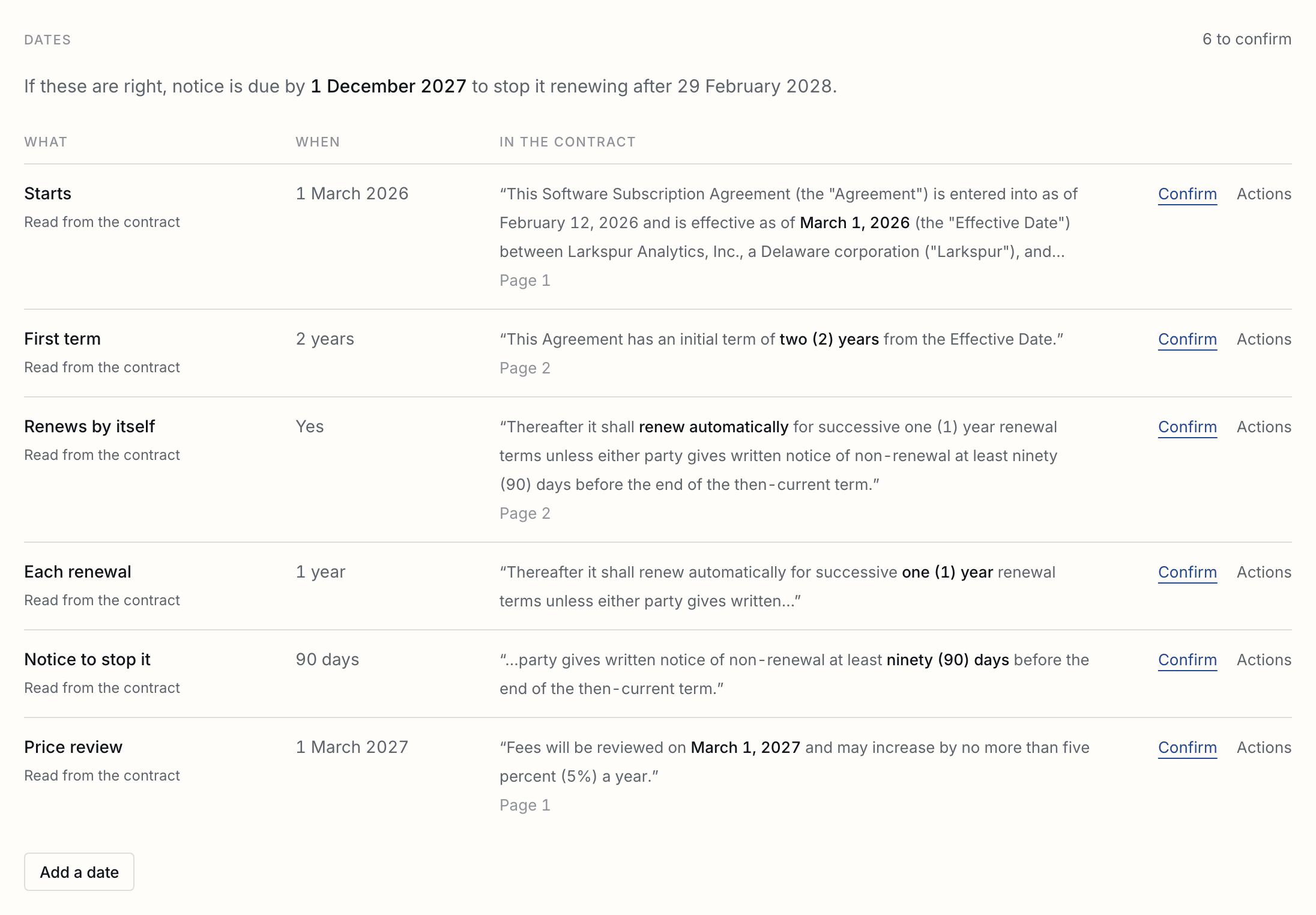
From what is confirmed, ShareSign works out the last day to give notice: the end of the current term, less the notice period. A contract that renews by itself is rolled forward term by term, so it keeps being reminded without anyone confirming it again. You, and anyone in the workspace you add, are emailed 30 and 7 days before each date, or 90, 30 and 7, 60, 30 and 7, 7, or never; each email quotes the contract’s sentence.
When a contract that renews by itself should not, Draft the notice not to renew, beside the last day to give notice, makes the letter: from your firm to the other side, with the contract’s title, the day its term ends and the day notice is due, written from its confirmed dates. It opens as a draft for you to check, change if you like, sign and send, with the other side given the signed copy if you add their email. The reminder before the notice date says so.
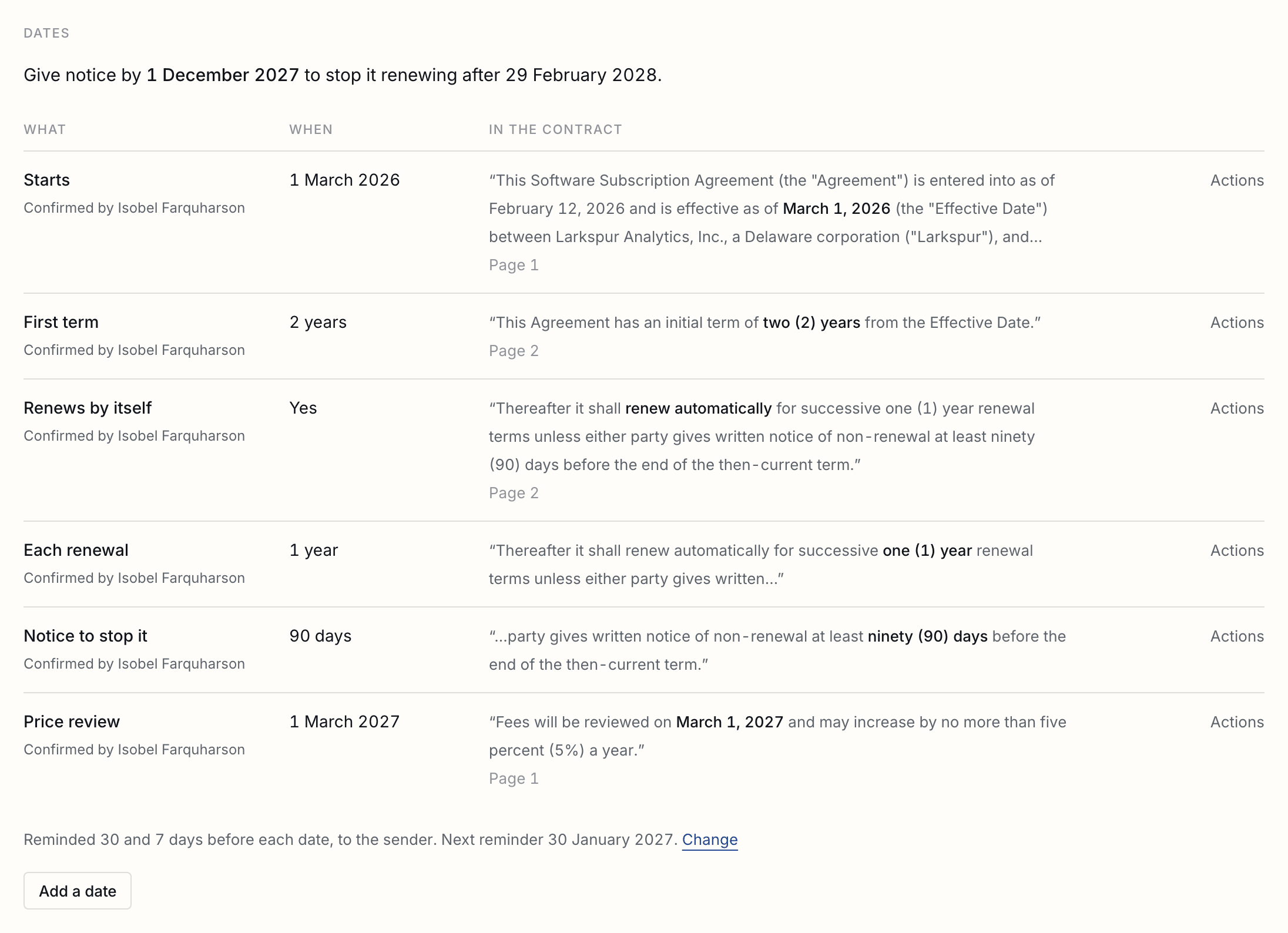
Contract dates, reached from Documents, lists every confirmed date still to come across the workspace, soonest first, with the next reminder for each, and every contract with dates still to confirm. Documents signed before contract dates existed are read from there, 200 at a time. Add to my calendar gives you a private address for Google Calendar, Outlook or Apple Calendar, which keep the dates current as all-day events; it is shown once, a new one stops the old, and it stops answering if you leave the workspace.
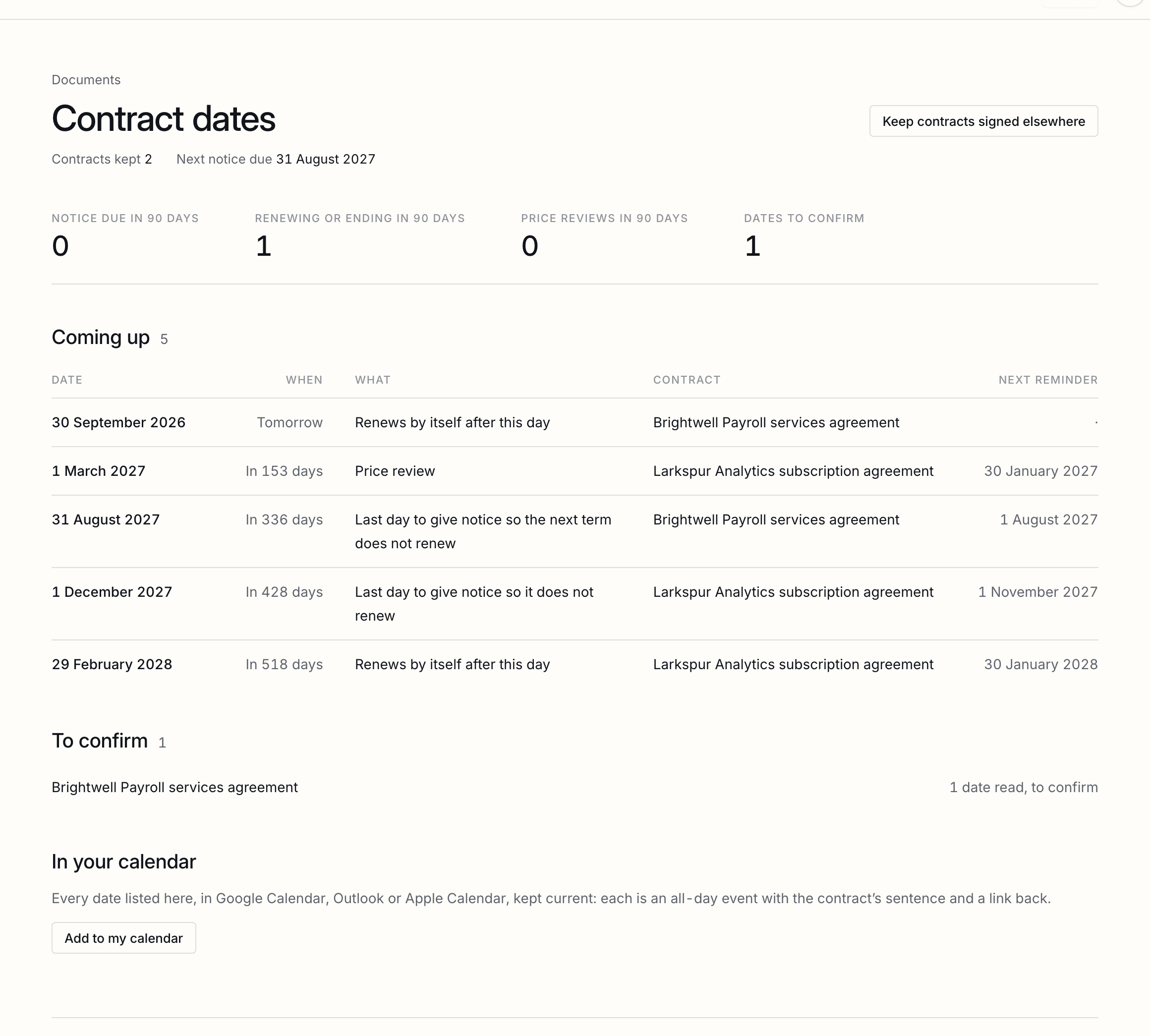
A contract signed somewhere else, on paper or with another service, can be kept here too: Keep contracts signed elsewhere, on the same page, takes the signed PDF, up to 20 MB, and reads it for its dates like one signed here. Choose several, or a zip of your whole archive, and each is kept under its file’s name and read the same way; a file already kept is named and not kept twice. It is listed with your documents as Kept. It was never sent through ShareSign, so it has no certificate and no seal, and it is not counted as a document sent. A scan is read with text recognition first, its first 40 pages, which can take a minute or two.
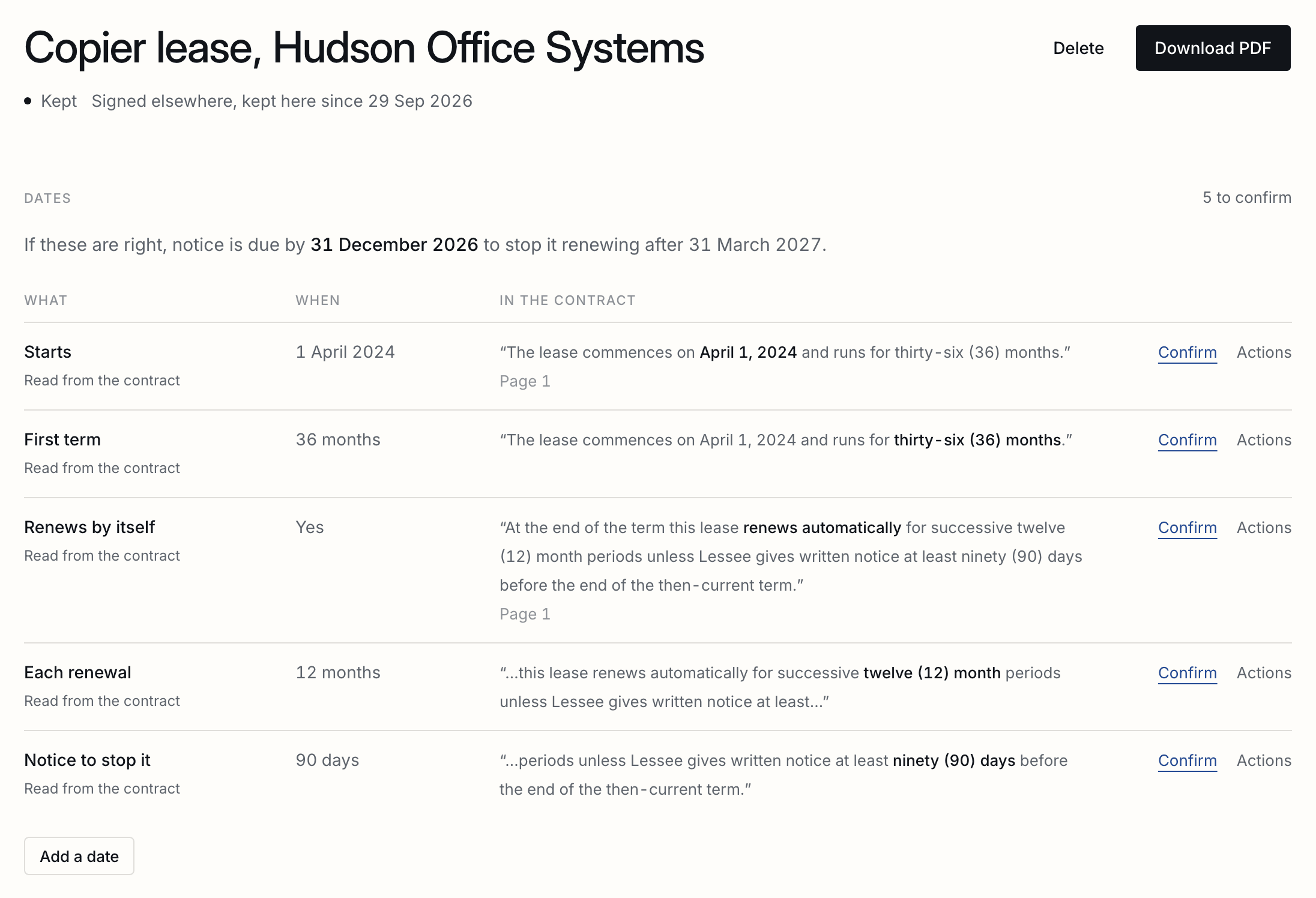
| Missed or wrong | Add a date the reading missed, change one it got wrong, or add a dated line of your own, such as an insurance certificate due. Every change is in the document's activity, with who made it. |
|---|---|
| Dates in numbers | A date such as 03/04/2027 is read the way the contract itself shows it writes dates: a day above 12 settles it, and otherwise it is read as 4 March. Its sentence is always beside it. |
| Business days | A notice period in business days skips Saturdays and Sundays. Public holidays differ by place and are not counted, so a deadline near one is worth a look. |
| Signed before this | A contract signed earlier, or one where nothing was found, has Read the contract for its dates on its page. |
| A scan | A contract with no text to read says so, and you add its dates yourself. |
Somebody approves it first
A document waits for a colleague before it leaves, set for people who cannot approve or for everybody.
On Business a workspace can ask for a document to be approved before it goes out. An owner or an admin sets it in Settings, Sending, and it is off until they do. Whoever can approve has a queue, reached from Documents, with each document’s note beside it. Whoever prepares the document presses Put up for approval instead of Send, with a note saying why, and nobody is emailed until it is passed.
| Off | Nothing changes. This is how every workspace starts, and it is the right setting for one person. |
|---|---|
| People who cannot approve | Anyone who is not an owner or an admin puts a document up; owners and admins send as they always did. |
| Everybody | Every document waits, including a partner's own, and the person who approves it cannot be the person who put it up. Where you are the only person who can approve, you may pass your own, and the document's history says so. |
| While it waits | It cannot be edited. Take it back to change it, which clears the submission, or the approver sends it back with a reason. |
| Approving | Approving is sending: one action, one moment, one line in the history. There is no approved document waiting to go out later. |
| A spreadsheet | A bulk send is approved once, for the whole batch, not row by row. The rows then go out on the approver's authority. |
| From code or an agent | The same rule. A key or an agent that may send puts documents up for approval instead, and a person passes them. |
In your name and colours
Your logo, colour, sender name and reply-to address on the emails and the signing page.
Every email already comes from you by name. On the Business plan the emails and the signing page also carry your logo and accent colour in place of ours, a sender name of your choosing, and a reply-to address for the whole workspace, used once you have confirmed it from that mailbox. The settings survive a downgrade and apply again when the plan does.
Your own address
A workspace name of your own, so every link you send reads yourfirm.sharesign.co rather than ours.
On the Business plan a workspace takes a name of its own, and its signing pages and data rooms are served at that address: yourfirm.sharesign.co rather than ours. Every link you send from then on carries it, in email, from the API, and on a public template link. There is nothing to set up with whoever looks after your domain, and no certificate to wait for: it works the moment you take it.
Names are first come. A few are kept back, either because we use them for the machinery or because they would read as an instruction rather than as you. The field says which while you type.
Changing your address breaks nothing you have already sent. The old one keeps answering and takes people to the new one, and nobody else can take a name you have given up for a year. A downgrade keeps the name and stops putting it on new links, the same way the rest of your branding behaves.
The address serves what your signers and guests are sent to, and nothing else. Your own dashboard, settings and API stay on sharesign.co, so there is one place you sign in.
The documents list
What waits on others and for how long, in a sentence, then the list in groups by what each document waits for.
Documents opens with a sentence saying how many documents wait on others and which has waited longest, then three numbers: how many wait on others, how many everyone has signed (being completed, or held for a closing), and how many are completed, this month too. They count the whole workspace.
The list below is in groups, by what each document waits for: ready to send, waiting on others with the longest wait first, signed by everyone, awaiting approval, and drafts; then, set quieter, completed and kept, and ended.
Several at once
Tick documents on the list to remind, download or void them together, up to 50 at a time.
Tick documents on the documents list, and a bar above it offers what can be done to them together. Each button says how many it applies to, and anything it could not do is named afterwards.
| Send reminders | A fresh link to everyone the ticked documents are waiting on by email. Documents not out for signature are left as they are. |
|---|---|
| Download | One zip: the signed PDF of each completed document, and the document as sent for the rest. Up to 250 MB at a time. |
| Void | The ticked documents out for signature, with one reason that each signer is told. |
| How many | Up to 50 at a time, from one page of the list. |
Changing your mind
Void a document with a reason, or send a new version while it is out and have everyone sign that, and what changes once it is complete.
A draft or sent document can be voided with a reason. Nobody can sign it afterwards: a signer who opens their link sees that the sender voided it, and the reason is kept in the trail. A completed document cannot be voided, only deleted: what was signed stays signed. From Documents, select unsent drafts and choose Delete drafts. Confirm to move them to Recently deleted, where they can be restored for 30 days. Other selected documents stay unchanged. Deleting is covered on data and regions.
If the request fails, your reason stays in the dialog. Check the message and try again without retyping it.
Or, while it is out for signature, send a new version: New version on the document’s page takes a PDF or Word file with the same number of pages as the one it replaces, so every field stays where it is. Every signature already given is withdrawn, because it was given to the old text, and everyone signs the new version in the same order, emailed with your note on what changed. Values you filled in before sending stay. The trail names both versions by their SHA-256, and the old file is kept.
From code, or by an agent
The same limits and the same trail from the API, a Zap or an agent, with Send left to a person by default.
The API, Zapier app and connected assistants use the same document limits and activity trail. Choose the actions each connection may take. An assistant can prepare a document for you to review and send. The API reference lists its available actions.
Tell us what you were trying to do and we will fix the page. Write from the support page.
Last changed 26 October 2026.