Clients
A new client in one link: they sign your engagement letter, pay the retainer, and are let into a matter room once everything is in. Clients come with the Business plan. The names and amounts on this page are made up.
What a client link is
Set up once for a kind of engagement; one page for each client, which goes on where they left off.
A client link is set up once for a kind of engagement: the letter, the retainer, how it may be paid, and what happens before the matter begins. You send it to each new client by name and address. They get one page with your name on it, and do the rest on it, from any device, going on where they left off.
From the link to the matter
The whole of it in six steps, from setting up the link to the open room.
- Set up a client link under Clients, Client links, from one of your templates.
- Send it to the client, with the retainer when it is set for each client, and a note if you like.
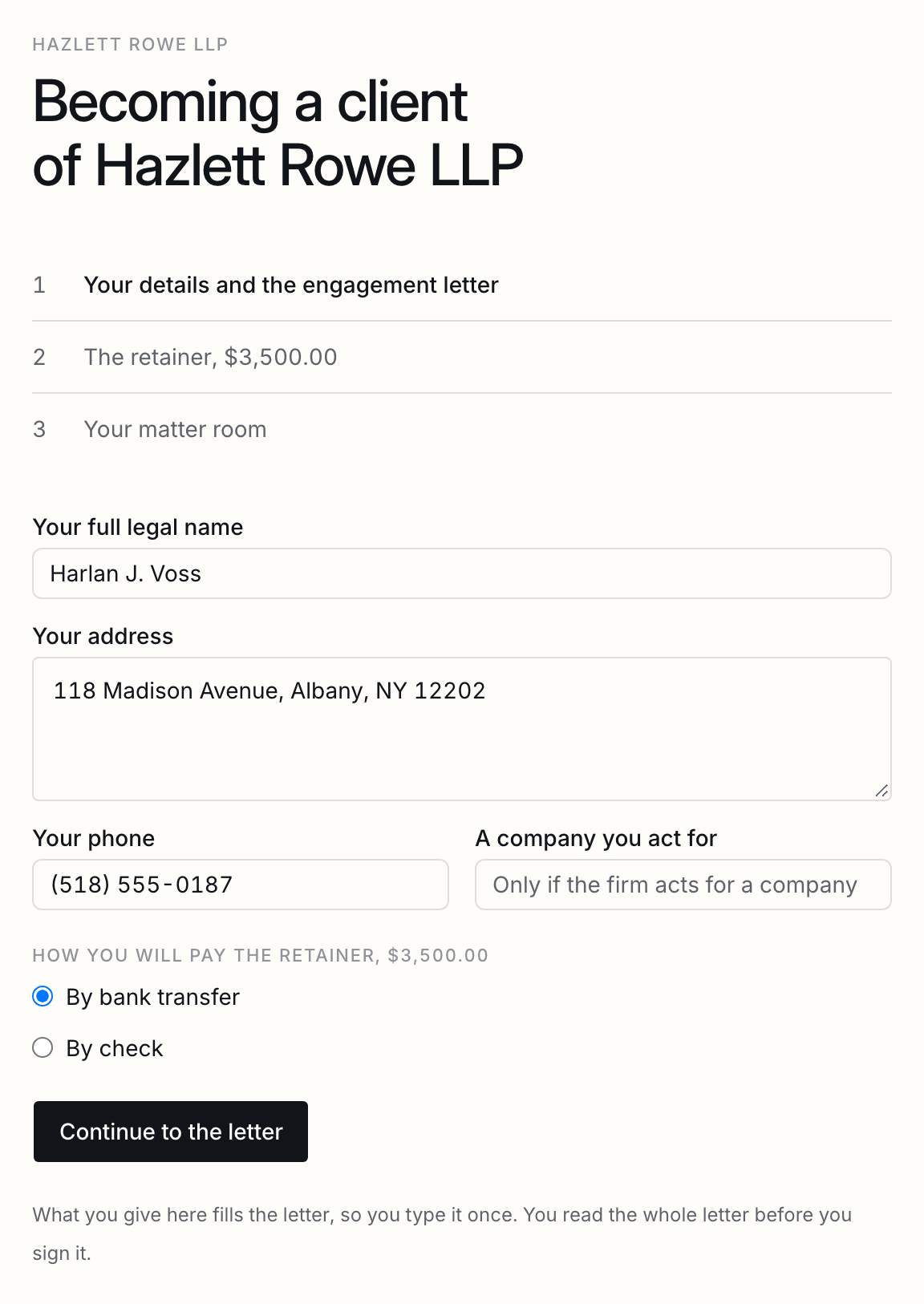
- They give their details and choose how to pay. Their details fill the letter, and they go straight on to read and sign it.
- The person the template names at the firm countersigns.
- They pay the retainer: by card when they sign, or by transfer, check, cash, or your own payment page, which you record when it arrives.
- Once the letter is signed by both and the retainer is in, their matter room opens, with the signed letter filed and the client let in. You are told once, when they are ready.
Setting up a link
The letter and the client's role, the fields they fill, the retainer, how it may be paid, the room, and who is told.
The engagement letter is one of your templates. Choose the role the client signs as; every other signer in the template must be pinned to somebody at the firm, who countersigns, so the letter can go out without anyone being asked. A field of the client’s labelled Name, Client name, Address, Company, Phone or Email is filled from what they type on their page, so they type it once; the setup page says which of yours it fills.
| The retainer | The same for every client, set for each client when you send the link, or none. You name it: Retainer, Deposit, Advance fee. |
|---|---|
| Where the money goes | Your operating account, or your client trust account. |
| How it may be paid | By card, by bank transfer, by check, in cash at the office, or on a payment page of your own. Offer any of them; the client chooses. |
| The matter room | Opened once everything is in, with the folders you list. It is a data room like any other and counts toward your plan's rooms. |
| Who is told | The person you choose, or whoever sent the client the link. |
The retainer, and who holds it
A card on your own Stripe account, never for trust money; a transfer, a check, cash or your own page otherwise.
ShareSign never holds your client’s money. A card is taken on your own Stripe account, set up in Settings, Payments: it is held when the client signs and taken when the letter is countersigned, straight into your account. Stripe’s fee comes out of it, and the payout, any refund and any dispute are in your own Stripe dashboard.
Because Stripe takes its fee out of a card payment, a card is never offered for money that goes to a client trust account: trust money has to arrive whole. For trust money, offer a transfer, a check, cash, or a payment page of your own, such as the one your trust account’s provider gives you.
| By card | Held at the signature, taken at the countersignature. Apple Pay and Google Pay where your Stripe account has them. |
|---|---|
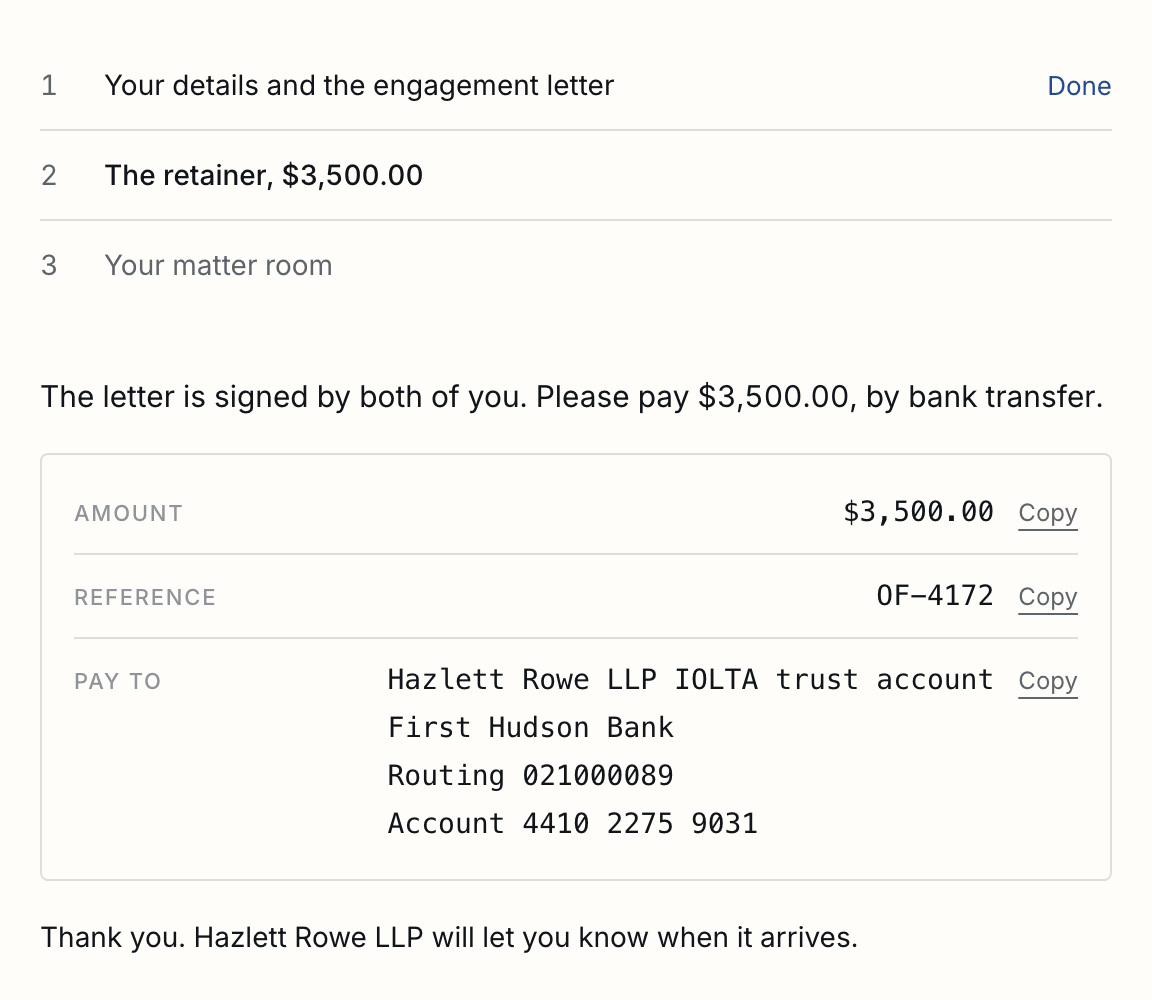
| By transfer | The client is shown your bank details and a reference of their own, each with a copy button. The same words go into the letter and onto its certificate. |
| By check or in cash | The client is shown where to bring it, and when, in your words. |
| On your own page | The client is sent to your payment page, with their reference. |
Money that arrives outside Stripe
Recorded by someone at the firm, in part or in whole, with a receipt to the client.
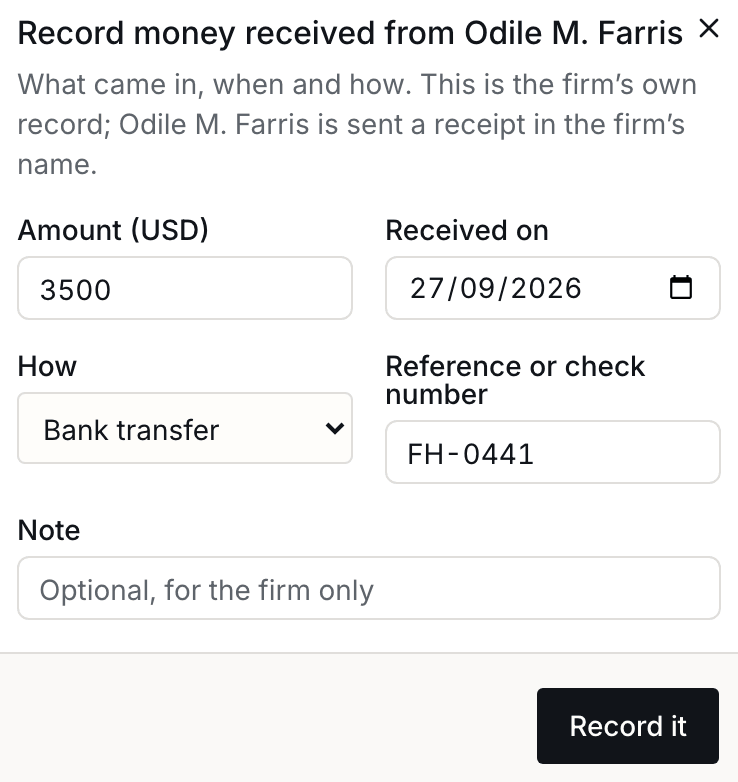
A transfer, a check, cash or your own page is recorded by someone at the firm when it arrives: the amount, the day, how, and a reference or check number. The client’s page and yours go on only once it is recorded. What was recorded, and by whom, stays on the client’s page; the record is the firm’s word, and says so.
| Part of it | Record what came. The rest is shown as still to come, on your page and theirs. |
|---|---|
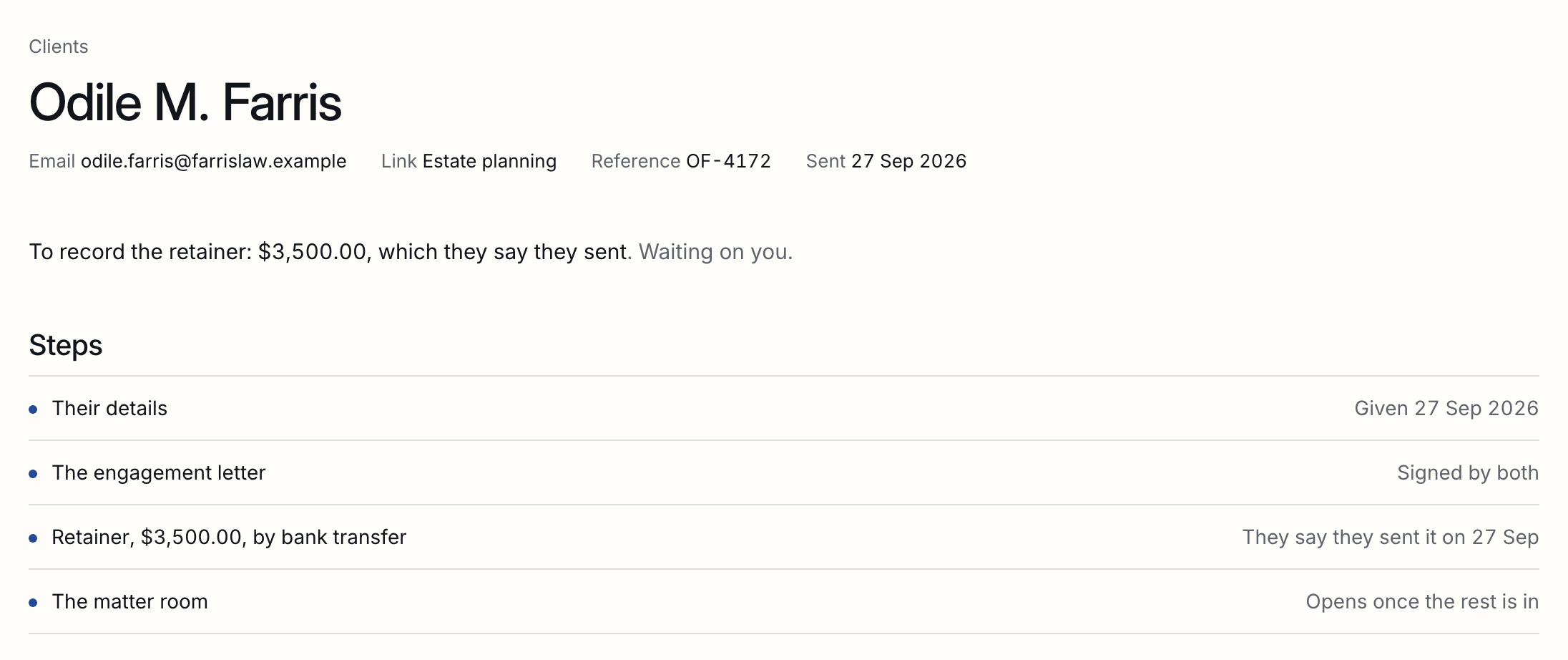
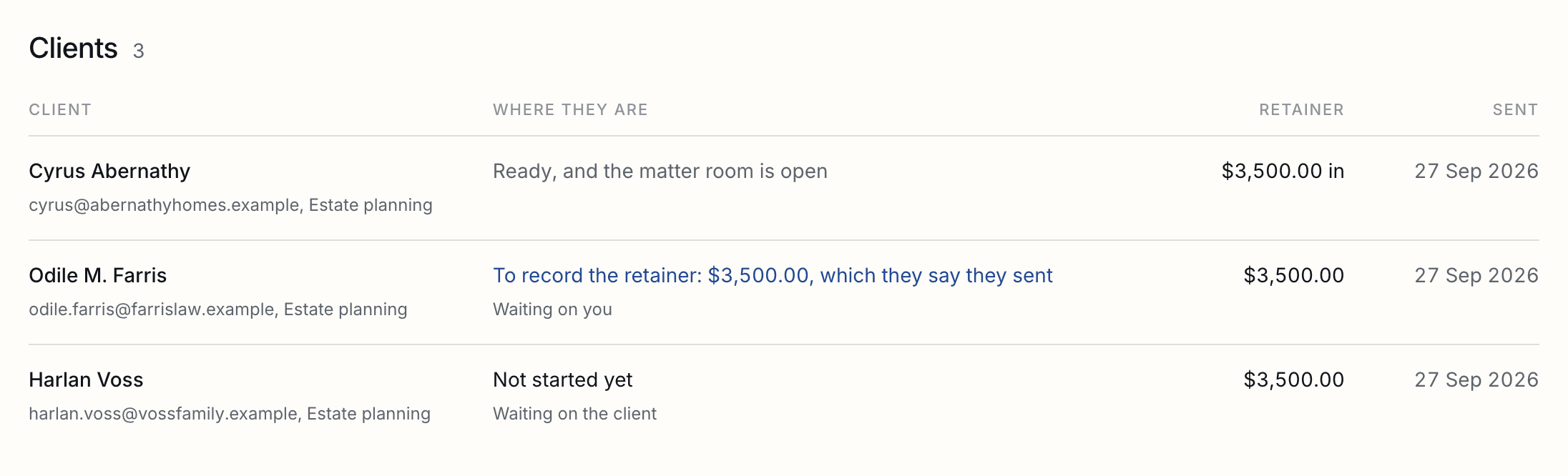
| They say they sent it | The client can say so on their page, and you are told. Nothing goes on until you record it; if nothing is recorded five days later, you are told once more. |
| Their receipt | Each time you record money, the client is sent a receipt in the firm's name, with what is still to come. |
| Going on without it | Go on without the retainer, with why; the record keeps who and when. |
The Clients page
Every client and whose move it is, reminders that go by themselves, the conflict question before sending, and one client's page.
Every client you have sent a link, with where each is and whose move it is: theirs or yours. Before a link is sent, earlier clients with the same name or address are named, which is your own conflict question; sending anyway is one more press. A client’s own page has each step as it stands, the money received and who recorded it, their link to copy, and a reminder to send them of what is left.
A client is reminded of what is left by themselves 3, 7 and 11 days after the link goes out, and never while it is your move. A reminder you send from their page counts: the next one waits two days after it.
On your website
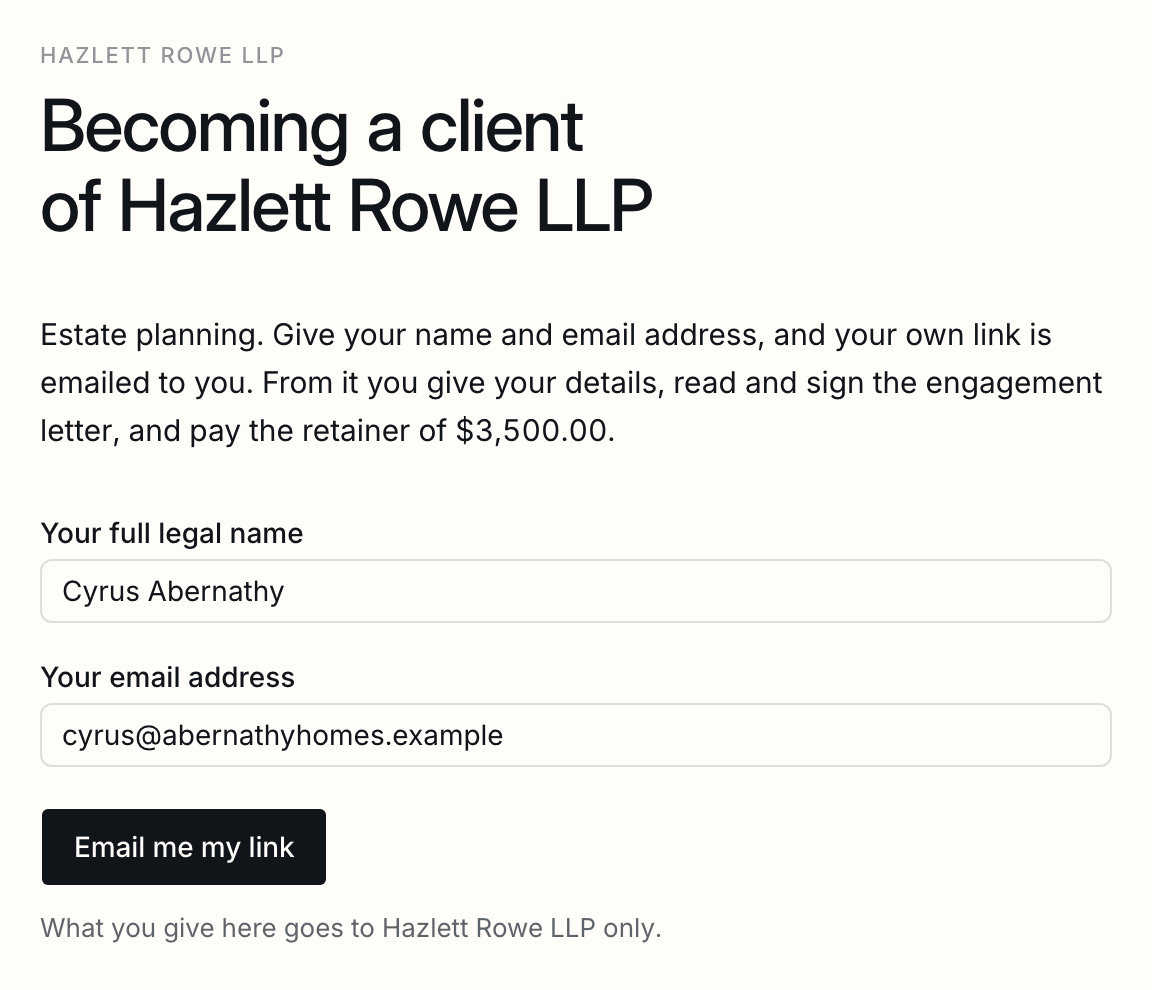
A link anybody can start from, up to a number a day, with their own link emailed to them.
A client link can also go on your website or in your email signature, for anybody to start from. They give their name and email address, and their own link is emailed to them, so a letter is only ever made in the name of somebody who can read that address. You are told each time, with anyone by the same name or address who has been a client before. Turn it on from the link’s page, under Clients, Client links.

| How many | Up to the number a day you set, from 1 to 200. Past it, the page asks them to write to you directly. |
|---|---|
| The same person again | Is sent their link again, not made a second client. |
| The retainer | Set on the link, or none: nobody at the firm is there to set it for each client. |
| Turning it off | The address stops working at once. Turned on again, it is a new address, which is how to stop one that has been passed around. |
Good to know
Changed details, a bounced address, a declined letter, a withdrawn link, rooms used up, a changed link, and approval.
| Changing their details | Before they sign, a client can change what they gave or how they pay; the unsigned letter is voided and a new one made, so what they sign is what they said. |
|---|---|
| Withdrawing a link | Voids the unsigned letter and lets any card held on it go. Their page says the firm withdrew it. |
| An address that bounces | Their row says so, until they start. Change their address from their page and the link goes there instead; the one sent to the old address stops working. |
| Declined | If the client declines the letter, you are told, as with any document. Send a new letter from their page: they are sent their link again with what they gave before filled in, and the letter is made from your template as it is then. |
| Rooms used up | If your plan's rooms are all in use, the client's page and yours say so, and Open the room now tries again once one is free. |
| Changing a link | Reaches clients sent it from then on. A client part of the way through keeps the letter and the retainer they were sent. |
| Changing one client's retainer | From their page, until they sign: a letter with the old amount is voided, and they are sent their link again. Once they have signed, the amount is what they agreed to. |
| Approval before send | If your workspace asks for approval, the client's letter waits for it, and their page says the firm is looking it over. |
Tell us what you were trying to do and we will fix the page. Write from the support page.
Last changed 27 September 2026.