Data Rooms
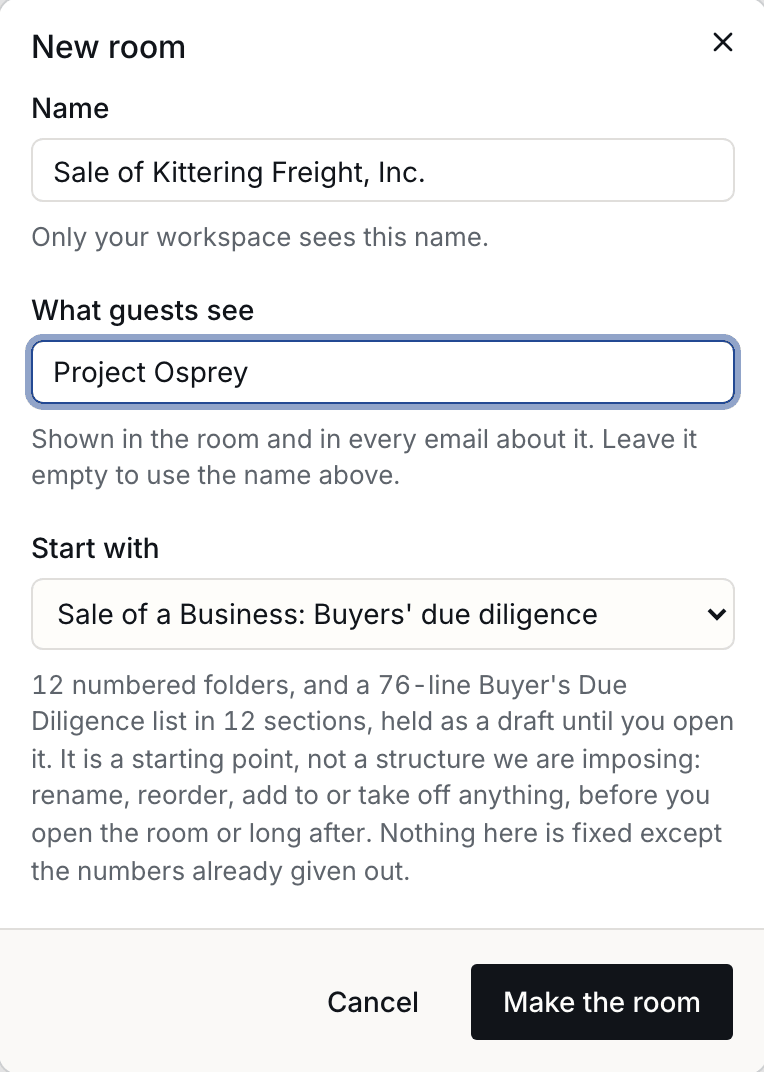
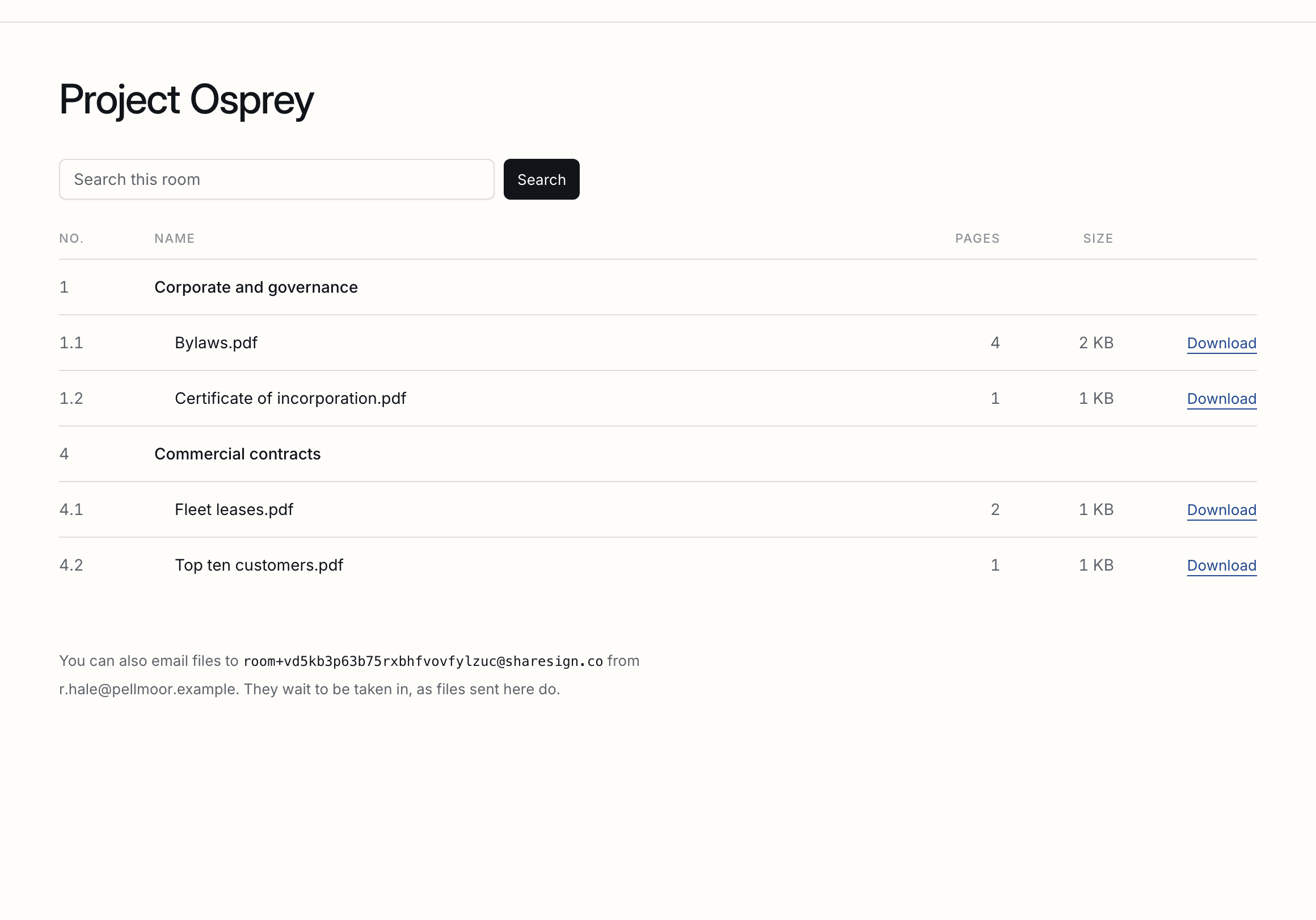
Share files with people outside your workspace: an index whose numbers never change, access per folder, a code on every new device, and a record of who saw what. Every picture on this page is of an example room, Project Osprey, for the sale of Kittering Freight, Inc., whose names are made up.
Browse guides
On this page
A room
What a room is for, the two names it carries, and who sees which one.
Data Rooms come with every plan: one open room on Free and Pro, three on Business. If Rooms is not in your navigation, an owner or an admin can switch it on in Settings, Features. What your workspace shows
A room holds folders and files for people outside your workspace: buyers of a business, investors, lenders, a tenant’s lawyer. It has two names: yours, which only your workspace sees, and the one guests see, in the room and in every email about it. A sale is often kept from the seller’s own staff, so the two can differ.
| Being built | Only your workspace sees it. Build as many as you like. |
|---|---|
| Open | Guests you invite can get in. Free and Pro include one open room and Business three. |
| Closed | Every guest is shut out at once. The room, its files and its record stay, and it can be opened again. Closed rooms are unlimited. |
Prepare and review a private room
Save an editable outline, recover its review link and deliberately create one private room.
Start before you have files. From Data Rooms, choose Plan a data room before uploading files to choose the business and check its preparation access. In Rooms, choose Prepare a room plan. Confirm the business shown, name the room and choose a starting point, such as Raising Investment. Edit the folders and preparation checklist to fit your business and stage.
- Use one folder or checklist item per line, up to 30 folders and 100 checklist items. A starting point replaces the outline below it; review those requests before saving.
- Choose Save plan for review. The saved plan has its own link under Your saved plans. It expires after seven days if not accepted.
- Read the saved outline, then choose Create this private room. Its folders and checklist remain private drafts. Add your real files and review them before separately opening the room or giving guests access.
If a save is interrupted, choose Check for saved plan. Repeating confirmation returns the same room. You can also reopen Rooms, Prepare a room plan to find your saved work. Unsaved form text is not restored after reloading. An accepted room that is later deleted cannot be recreated from that plan.
Native preparation uses your existing room-management access, including Free. Keep a saved plan open when reviewing a plan or asking another person to pay in a separate tab. A payer receives billing access, not document access or ownership of your business.
ChatGPT or Claude can help you discuss the purpose, stage, intended readers and missing material. The public plugins can research room documents after you add files; save the outline using the native preparation page when room-plan tools are unavailable. An existing expanded connection with separately approved private-plan preparation can return a proposal for the same human review. A suggested checklist does not establish that documents exist or that diligence is complete.
Research your room with ChatGPT or Claude
Answer investor questions with cited document research and explicit search coverage.
Use ShareSign in ChatGPT or Claude to find terms in the room documents you choose, with source citations. For a fundraise, ask which customer contracts contain financing, assignment or change-of-control consent requirements, keeping each trigger separate. Try the worked investor-diligence question and choose your assistant.
- In the room’s Files tab, choose Research this room with ChatGPT or Claude. Check the business and selected room.
- Write your question, review the prompt and choose Copy room research prompt. For example: Which agreements need investor consent before our next round?
- Open ChatGPT or Claude from the same page. Connect ShareSign to that business with room browsing and document-text search, then paste your question when ready.
- Check the answer’s cited files and pages. Return to your room to review the source wording and any amendments.
Keep the preparation page open while you connect. Check again refreshes access without clearing a question in the same room. If the room is unavailable, choose its business or return to your accessible rooms. An empty room needs documents before it can support an answer.
Assistant access is included on Free, within its resource limits; premium features keep their plan requirements. Approve room browsing and document-text search for the intended business; matching excerpts go to your chosen assistant. Search is keyword-based and may exclude unreadable, processing or inaccessible files. Check the returned coverage and cited pages. A draft answer is not a completed diligence review, and the assistant does not publish your room, invite investors or send the response.
Budgeting for a room
Apply an entered quote to a project and a delay, and retain its assumptions.
Use the data-room quote worksheet before committing to a provider. Enter the priced component of your quote, your project length and a possible delay. Monthly, paid-user, storage, one-off page and fixed-project rates are available.
For recurring rates, enter the monthly equivalent, minimum term and billing interval. A six-month project on yearly billing still commits twelve months. Enter known one-off charges once. Missing project-extension rates stay unpriced; a page charge alone cannot establish the cost of a longer project. Taxes and unquoted charges are excluded.
Your figures stay in the tab. Copy the summary and its assumptions to keep them; changing an input clears the result and reloading clears the figures. No account is required. Prices and allowances remain on ShareSign’s pricing page. When ready, use the guide’s first-room steps to prepare a private room and review access before sharing.
Starting from an index
Start empty or from numbered folders for the kind of deal, and change any of it until the room opens.
A new room can start empty, or with numbered folders for its kind: a sale of a business, a fundraise, a property sale or lease, a fund raise, or a board pack. Until the room is opened, rename, add, delete or renumber any of them.
Where things are
A room's six tabs: its files, its people, requests, questions, activity and its closing record.
| Files | The index, numbered, and a search across the words inside every file. |
|---|---|
| People | The groups, who is in each, what each may see and from which stage, and the domains the room takes or refuses. |
| Requests | Request lists, and the files guests send, waiting to be taken in. |
| Questions | What guests ask, your answers, and the day asking stops. |
| Activity | Who read what, page by page, and the room's record. |
| Closing record | The room sealed into one archive that anyone can check. |
The index
Numbers are given at publication and never reused, because contracts cite them.
Every folder and file has a number, such as 4.2.7, given when it is published and never changed or given to anything else, because contracts cite them. A file added later takes the next number in its folder. Withdrawing a file keeps its number and hides it from guests; restoring it brings it back. Until a room is first opened, you can delete numbered entries and renumber the index from 1.
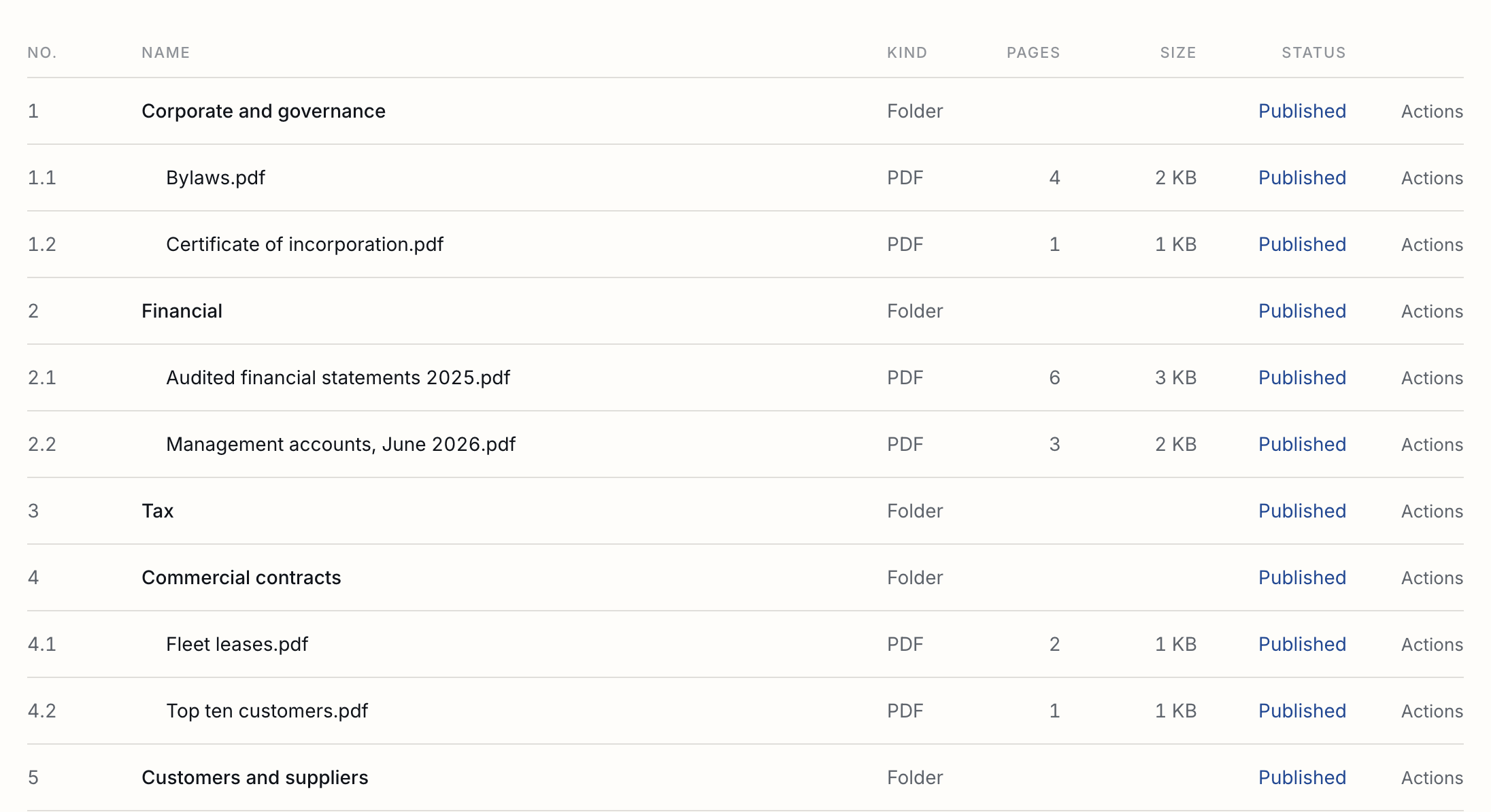
Replacing a file adds a version under the same number. Every version is kept, and the record says which one each person saw.
Uploading
Drop a whole folder and it keeps its shape. Up to 50 MB a file, with decks split into slides. Video is not available yet.
If a connection drops, press Resume upload beside the failed transfer. After reopening the room, choose Resume upload in the file's Actions menu and select the original file. Its name and contents must match. Parts that arrived are kept for six hours from the start; a smaller file is sent again under the same version. A replacement leaves the current version available until the new one is ready. When a file is awaiting upload, it waits for you to resume it.
Drop files or a whole folder onto the room: the folders keep their shape. A zip is unpacked into the folders it holds, as unpacking it on your desk would: one top folder stays as it is, and loose files get a folder named after the zip. A zip over 50 MB is refused before unpacking. A zip with more than 5,000 files or 1 GB inside, or with a password, is added as the zip itself, and the room says why. Files up to 50 MB except video, programs and scripts. Blocked upload attempts are recorded as file category and size, without filenames or contents, so we can understand what customers need. Use Suggest an improvement to tell us more if you wish. A PowerPoint deck becomes its slides, one slide a page, with the speaker notes left out. PDFs can be shown as pages up to the file limit. Other files are converted for reading up to 25 MB; above that they can be downloaded with download permission. Room storage is shared across all your rooms: 250 MB on Free, 15 GB on Pro and 50 GB on Business. When it is full, new uploads stop; nothing is deleted, and guests keep reading and downloading what is already there. You are emailed at half full, three quarters and nine tenths, so the day an upload is refused is never the day you first hear about it. Nothing is shown to anyone until you publish it, so you can check the index first. Publish a file while it is still being read and it is published as soon as it has been; until then its row says “Being read, then published”, and Keep it a draft takes that back. Each file is read once for its SHA-256 fingerprint, and a PDF for its pages.
Guests
No account, a link that is theirs alone, and a six-digit code on each new device.
A guest does not make an account. Their invitation link is theirs alone, and on each new device they enter a six-digit code sent to the address they were invited at. The code works for 10 minutes on the device that asked for it. A forwarded link opens the door and nothing behind it.

| A new domain | Inviting someone at a domain nobody in the room has yet asks you to confirm it first, because a mistyped address is how the wrong person gets in. |
|---|---|
| One group each | An address sits in one group, so the same adviser cannot sit with two bidders unnoticed. |
| Shutting out | One person, or a whole group at once, on every device they used. Letting them back sends a new link; the old one stays dead. |
| In several rooms | A guest in more than one of your open rooms sees the others at the foot of each, each by its own link and its own code. At sharesign.co/r they can have every link they hold emailed to them. |
| An end date | A group's access can end on a day you choose. |
| What guests never see | Group names, other guests, or your own name for the room. |
| A lost invitation | At sharesign.co/r a guest enters their address and is emailed the link to every open room it can get into. The page says the same whether or not the address has any. |
An NDA before the first page
Ask a group to sign one of your own templates before a single page is shown.
A group can be asked to sign an NDA before anything in the room is shown. It is a document made from one of your own templates, signed on the same signing page as any other document, with its own certificate; the guest is emailed a signed copy and comes straight back to the room. The template needs exactly one role left open for the guest; anyone else, such as you as the other party, is pinned in the template.
| Each person, or one for the firm | Ask everyone in a group to sign their own, or let one signature cover the whole group. |
|---|---|
| Their own version | If a guest sends back their own signed NDA, you can let them in and say what was signed; the record keeps the reason. |
| Where it lives | The NDA is a document in your workspace, with its audit trail, like any other. |
| Plans | NDAs are made from templates, which come with Pro and Business. |
Access per folder
Grant the room, a folder or one file, and where nobody has chosen the answer is no.
Each group sees only what you grant it: the whole room, a folder, or one file. The nearest choice above an entry decides, so “the whole room except Legal” is two choices. Where nobody has chosen, the answer is no, and a file that is not published is never shown whatever was granted.
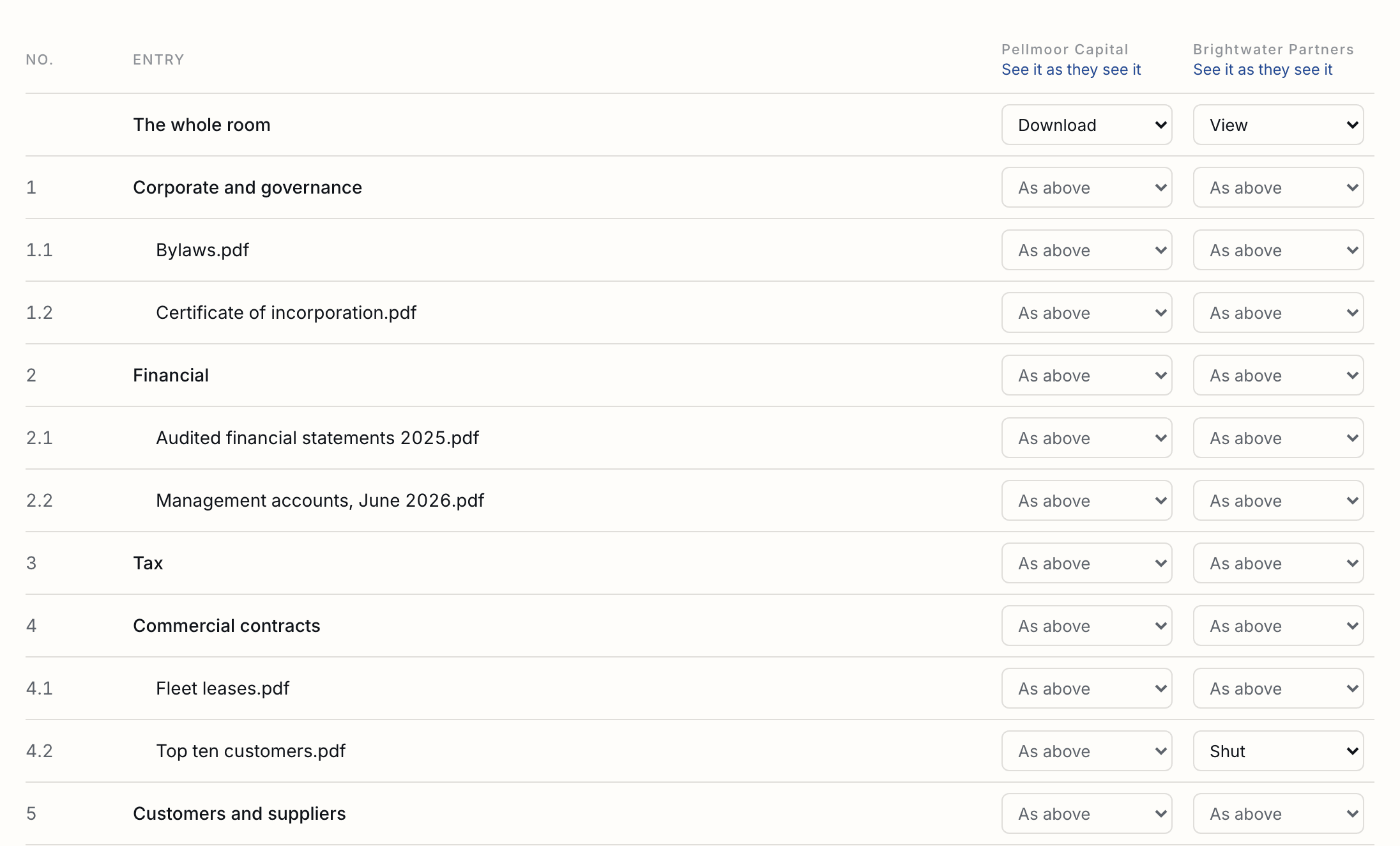
| View | The group reads the file in the room: a PDF, Word file or photo as pages, a spreadsheet as its values. Each page carries the reader's address, the time and where they are, and the file itself never reaches them. |
|---|---|
| Download | The group can also take the file away, and a PDF goes out with the reader's address and the time drawn across every page, the same mark they see on screen. Each download is recorded with the version, its fingerprint and the mark that was put on it, so a page that turns up somewhere else says who took it. A file that is not a PDF, or one over 50 MB, goes as it is and the record says so. |
| Shut | Closes a folder or file inside one that is open. |

Before inviting anyone, See it as they see it shows exactly what a group will be shown.
Stages
Folders that open to each group at a stage you set, now or at a moment you choose, with its guests told what opened.
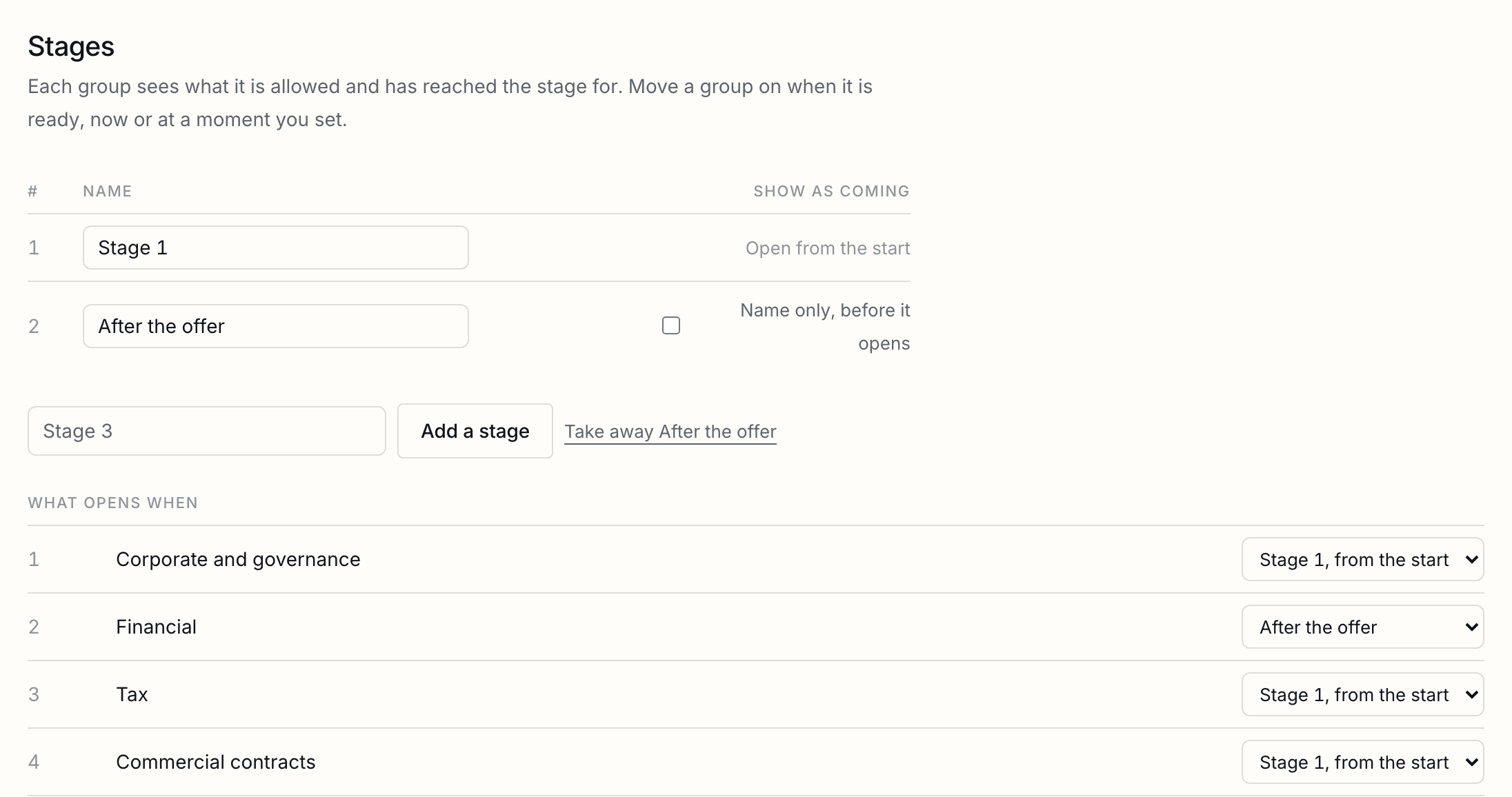
A deal opens in steps: the information memorandum for everyone, the financials after an offer, the rest for whoever is chosen. Add stages under Stages on the room, set the stage each folder opens at, and move each group on when it is ready, now or at a moment you set. A group sees a file when it is allowed it and has reached the stage it opens at; a stage never lets anyone see something they were not allowed.
| Before a move | The page says what the move opens, by number and name: "Bidder B will see 3 folders and 41 files more." Moving back says what it hides. |
|---|---|
| After a move | The group's guests are emailed what opened, and it is marked new in their index. Nothing is sent about a move back. |
| Hidden until then | What opens later is not in a group's index at all, because even a folder's name can tell a bidder something. For any stage you can choose to show its folders' names instead, marked Opens at a later stage, with nothing inside. |
| Inside a folder | Nothing opens before the folder it is in. |
| Moving back | Hides again what the earlier stage did not open. A file already downloaded stays downloaded; the page says so before you move. |
| Questions | An answer published to every group about a file that opens later waits, for each group, until that group reaches it. |
| Numbers | A file keeps its number whether or not a group can see it yet, so a group may see 4.1 and 4.3 before 4.2 opens to them. |
| The record | Every move is in the room's record, and the closing record lists the stages, what opened at each, and when each group moved. |
Your name on the room
The pages and emails a guest sees carry your name, logo and colour.
On Pro and Business, the pages and emails a guest of a room sees carry your workspace’s name from the start, and the logo and colour you set in Settings, Branding. On Business they also carry them on your email and signing pages. On Free, a room carries ShareSign’s name. A guest’s page always says who powers the room until your plan brands everything.
Request lists
The other half of a room: what you are still waiting for from the other side, in their own numbering.
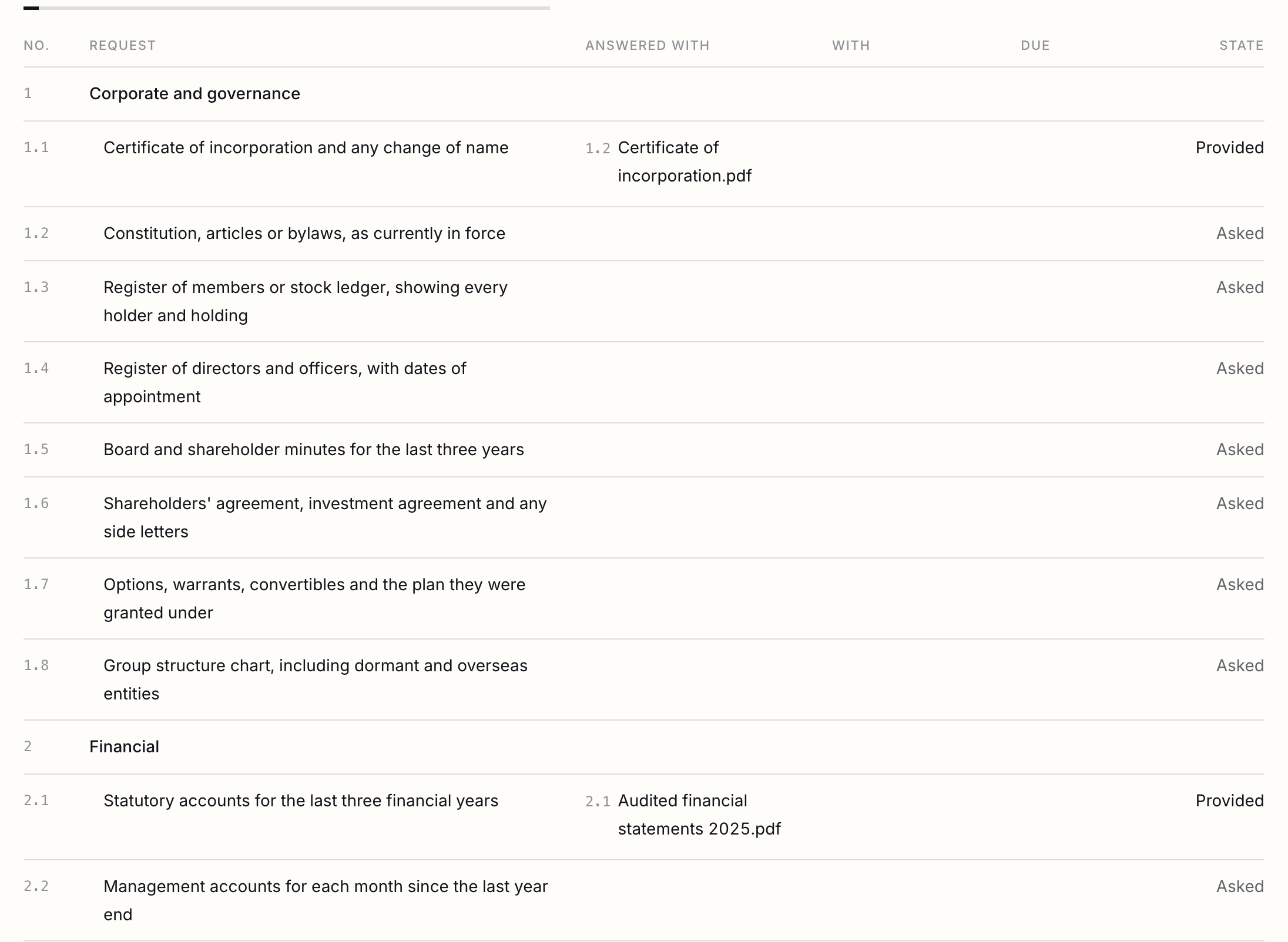
A request list is the other half of a room: the index is what you have published, the list is what the other side is still waiting for. Make a list, say whose it is, and paste theirs in: numbered lines keep their own numbering, sections and all, so 4.2 means 4.2 in every email afterwards. Answer a line with a file already in the index and it goes to provided, against the version that was there at the time. A draft list is yours alone; opening it shows the group where every line stands.
| Pasting a list | One line per request, up to 500 at a time. A number at the start is kept; a tab or a semicolon puts a note beside the line; bullets and plain lines keep the order they were written in. |
|---|---|
| States | Asked, With us, With them, Provided, Accepted, Declined, Not applicable. Declining or setting a line aside asks you why, and the other side reads the reason. |
| Changing a line | Change, at the end of a line, opens its answer, owner, date and state beneath it; the list itself shows only what each line says and where it stands. |
| A date and an owner | Each line can carry a date and a person in your workspace who owes it. |
| What they never see | A file their group may not see is never named on their list. The line says it has been provided and that it is not shared with them. |
| A newer version | A line answered with a file says so when that file has moved on since, so accepted always means accepted against what was there then. |
| Numbers never move | Taking a line off the list keeps its number: 1.2 is never handed to a different request. |
| They can ask too | A guest can ask for something that is not on their list, up to 30 a day. It joins the list marked as theirs, waiting on you, and you are emailed once. |
| Chasing | Anything past its date is named in the one email a day the room already sends, never in an email of its own. |
Moving something, without renumbering the room
An entry moves and takes a new number, and the gap it leaves is deliberate.
An entry can be moved into another folder from its Actions menu. It takes the next free number where it lands, and nothing else in the room moves. A gap where it used to be is the right answer, not an untidiness: somebody may have written 4.2 into a schedule, and a room that shuffles its numbers under them has made their citation wrong.
| The moved entry's own number | Changes, because a number is where a thing sits. The record says both, so anybody holding the old one can follow it. |
|---|---|
| Its old number | Spent. Nothing else in that folder will ever be given it, whether by moving or by uploading. |
| A folder | Moves with everything inside it, and each of those keeps its own number within the folder. |
| An empty folder to tidy into | Publishes itself when the first published entry is moved in, the same way publishing a file publishes the folders above it. |
| What guests can see | Follows the new folder. An entry that had its own grant keeps it wherever it sits, so check the access table after moving something sensitive. |
| Before a room is opened | Nothing has been promised yet, so the index can also be tidied whole and renumbered from one. |
What a file carries
Every file from outside is scanned and looked at again before anybody in your workspace can open it.
A file that arrives from outside is looked at twice before anybody in your workspace can open it. A scanner with a signature database reads it, and a file it names is refused outright: it cannot be taken into the room, flattened or otherwise. Then it is read for what a signature database does not catch, which is what actually turns up in a data room. A file nothing was found in is a file nothing was found in, which is not the same as a promise.
| What it looks for | A PDF that runs JavaScript, one that does something by itself when it opens, one with another file tucked inside it, a spreadsheet or document carrying macros, a file that is locked so nothing could be looked at, and a file whose name says one thing while its contents say another. |
|---|---|
| Nothing is refused | A real form carries JavaScript and a real workbook carries macros. You are told what was found and you decide. |
| Taking it in flattened | Rebuilds a PDF from pictures of its pages, so whatever it carried does not come with it. The text stops being selectable, which is the trade. |
| Taking it in as it is | Asks you to confirm, and the room's record says the decision was made and what had been found. |
| What the sender is told | That it arrived. Nothing about what was found, because that is a list of what we look for. |
Taking things out of a file
A black box hides nothing, so the copy is rebuilt from pictures with no text left underneath.
Mark what should not be read, and ShareSign makes a copy without it. A black box drawn over a word hides nothing: the word is still in the file and anybody can select it. So the copy is rebuilt from pictures of the pages, and there is no text left under the box to select, copy or find.
| What it finds for you | Bank accounts, card numbers, national insurance and social security numbers, phone numbers, email addresses, dates of birth, and figures that look like somebody's pay. Each one is offered with a box drawn where it sits, and nothing goes until you accept it. |
|---|---|
| A name everywhere | Type a name and every place it appears is marked, on every page, for you to look at before anything goes. |
| What it costs | The copy has no selectable text, and it is a larger file. That is the price of the words actually being gone. |
| Your original | Kept as the version before it. Guests are only ever served the copy. |
| A scan | Has no text to look through, so mark what should go by hand. |
| Two people at once | The second is told the file has moved on rather than writing over the first. |
| In the record | How many things came out of how many pages, and what kind they were. Never what they said. |
Finding a word
Search inside the files, not only their names, and open one at the page that matched.
A box above the index searches inside the files, not only their names. A result says which file, which page, and the words on either side of the match, and it opens the file at that page. Guests get the same box, over the files their group can open and nothing else.
| What is searched | The words on every page of a PDF, and of a Word file, deck or photo after it is turned into pages. Read once when the file arrives. |
|---|---|
| Scans | A file with no words in it is read by machine, in the background, up to 400 pages. A long one takes a few minutes and the search says so while it is going. |
| A guest's answer | Only their own files. A word that appears only in a file they were not given returns nothing, and never names the file or counts it. |
| A redacted file | Answers nothing. Its words left the search when the redaction was made, and the copy that replaced it is pictures. |
| A scan | Read by machine, so it answers too. It says so on each result, because a machine reading a picture of a word gets it wrong sometimes and you should know which kind of reading you are looking at. |
| A spreadsheet | Named under the answer with the reason, so nobody concludes their file is missing. It is read as a table of values instead. |
| What a search finds | Up to 40 places, best match first, and it says so when there were more. |
| In the record | What each guest searched for and how many of their files answered. A search that found nothing is in there too. |
Video is paused
Uploads and guest video access are paused; existing originals and watch history are retained privately.
Video uploads, playback and guest downloads are not available at present. Existing video originals and watch history are retained. Workspace members can retrieve their originals privately. You can suggest what you need from the upload area; submitting a suggestion is optional.
Printing, and what it can honestly do
Printing can be turned off for a group. What that honestly stops, and what it does not.
A group can be set not to print. The pages are then hidden from a printer and the reader is told why. That is a deterrent, and we would rather say so than sell it as a wall: anybody can photograph a screen, and no website can stop them. What does hold either way is the mark drawn into every page, so a printed or photographed page carries the reader’s address and the time it was read.
| Where it is set | Per group, beside the NDA and the end date. On for every group until you turn it off, including rooms made before this existed. |
|---|---|
| What a reader sees | One line saying the room is not set up for printing, and who to ask for a copy. |
| In the record | Every print, and whether the group was allowed to. A print in a group that cannot is the line worth reading. |
| What we hear | What the browser tells us, which is most of them and not all. Counted once per reader per file. |
| A download | A different thing, set per folder. A guest who may download takes a marked copy away and can print that. |
Who a room takes
An allow list and a block list decide who can get into the room at all.
Two lists on the room decide who can get in at all. Only these is an allow list: nobody outside it can be invited or open the room. Never these is a block list, read first, whatever anything else says. Both take addresses and domains, pasted in any order.
| When they are read | When somebody is invited, and again every time they open the room. Blocking a domain shuts out anybody from it who is already inside, and ends their sessions in the same moment. |
|---|---|
| What a refused person sees | Exactly what a stranger sees: this link is not valid. Nothing says they were blocked, or that the room exists. |
| Before it shuts anybody out | A list that would exclude somebody already in the room names them and asks first. |
| Spelling it differently does not help | Capitals and a plus-tag are ignored, and a domain written in another script is compared as punycode, so a lookalike does not walk past. |
| Subdomains | Blocking a domain does not blindly block everything under it. Tick the box when you mean it to. |
| Personal addresses | One button adds the common personal-mail domains to the block list. |
| In the record | Every line added or removed, and every time a refused address knocks on the door. |
Files guests send in
A file a guest sends back waits where only your workspace sees it until you take it in.
A guest can send a file back: against one line of their list, or on its own. It does not go into the room. It waits in Sent in, where only your workspace can see it, and reaches the index when you take it in. Taking it in puts it through the same path as your own uploads, so it is hashed and read for its pages the same way, and the line it answered moves to provided.
| Where it goes | A staging area outside the room. No guest sees it, not even the one who sent it, until you take it in. |
|---|---|
| Turning one away | Say why. The guest reads the reason and the file is deleted from storage. |
| Limits | Up to 50 MB a file and 25 files a day for each guest, with a ceiling on what can be waiting in one room at a time. |
| What is refused outright | Programs and scripts, the same as anywhere else in a room. |
| Storage | Counts against your allowance only once you have taken a file in. |
| The record | Every arrival, every file taken in and every one turned away, with the reason, in the room's own record. |
Files by email
A room's own address: your colleagues' attachments arrive as drafts, guests' wait in Sent in, and anybody else is turned away.
Each room has an address of its own, on its Requests tab. Files attached to an email sent there go into the room: from you and your colleagues, into the index as drafts, the same as your own uploads; from the room’s guests, into Sent in, the same as a file they send from the room, and they are shown the address there. Pictures in a signature are left out.
| Who it takes mail from | People in your workspace, and the room's guests, from the addresses they were invited at. Mail must provably come from that address; anybody else is turned away without a word, so a leaked address says nothing about the room. |
|---|---|
| What the sender hears | A receipt listing what went in, and what did not and why. |
| A leaked address | New address on the Requests tab makes another one; mail to the old one is turned away from then on. |
Questions and answers
Guests ask about the room or about one file, and you choose who reads the answer.
Open questions until a date, and guests can ask, about the room in general or about one file. You see who asked, from which group, and answer. An answer reaches the asker’s group; tick one box and every group reads it, without who asked or which group they are in. A guest never sees another group’s questions.
| Closing without an answer | Say why; the asker's group reads the reason. |
|---|---|
| Emails | Whoever made the room is emailed each question; the asker is emailed when it is answered, with a link back and nothing of the answer. |
| Limits | Up to 25 questions a day for each guest, and none after the date you set. |
| The log as a spreadsheet | Download every question and answer as an Excel file, in the order of the index: one sheet with everything and one for each group, with who asked, who answered, and the earlier wording of any answer you changed, with the day it changed. |
| As one group sees it | Choose a group to download only what they can read in the room, ready to send them. It names no group, holds no other group's questions, and names no file they cannot see. |
| A guest's own copy | Guests download their group's log themselves, numbered on its own, with their address on every printed page. Each download goes in the room's record. |
Who read what
Each person's files, pages and downloads, and which page of a file was read most.
The room’s Activity tab shows each person’s files, pages and downloads, and for one person the pages of each file they reached. Each file shows how many people read it, its page views, the page read by the most people, and its downloads. A page counts when a reader’s browser asks for it, which it does as the page comes into view.

| The first time | Whoever made the room is emailed when a guest comes in for the first time. |
|---|---|
| Once a day | On a day guests came in, read, signed the NDA or downloaded, whoever made the room gets one email saying who did what. |
The record
Every upload, invitation, new device and download, chained by SHA-256 the way a document's trail is.
Every upload, publication, withdrawal, invitation, new device and download is written to the room’s record, on its Activity tab, each entry chained to the one before it by SHA-256, the same way a document’s audit trail is.
The closing record
One archive with the index, every fingerprint, who was let in and who read which page.
At the close, or at any moment, make a closing record from its tab: one archive holding the index with every version’s SHA-256 fingerprint, the room’s whole record, who was let in and what each group could see, who read which page of which version, every question and answer with any earlier wording, and a certificate. The certificate states the seal, the SHA-256 of the manifest in the same archive, so anyone can check it without ShareSign: work out the manifest’s fingerprint, compare it with the seal, then compare any file with the fingerprint listed for it.

| The files | In the archive, named by their numbers, while the room's files come to 250 MB or less. Above that the archive holds their fingerprints, and each file downloads from the room. |
|---|---|
| As often as you like | Each record is kept with its seal and when it was made. |
Handing the room to the buyer
A copy of the room, same numbers and fingerprints, with its closing record, in the buyer's own workspace.
At completion, the buyer can have the room for their own workspace. On the Closing record tab, press Hand it over and give their address; they are emailed a link that works for 30 days, once. They sign in to ShareSign with that address, or make a free account with it, choose one of their workspaces, and the room is copied there.
| What goes | Everything guests could see, under the same numbers, withdrawn entries included, each file with the same SHA-256; and a closing record made at the moment you pressed, at the top under the next number. |
|---|---|
| What stays | Drafts, stages, groups, guests and questions. The copy is closed to guests until the buyer opens it to theirs. |
| Your room | Stays as it was. Its record says when it was handed over and to whom, and you are emailed when it is taken. |
| Changing your mind | A link not yet taken can be withdrawn from the same tab, and then opens nothing. |
Starting points, and why they are only that
We give the folders and the numbering, never the legal text, and you can change all of it.
A new room can start from a numbered index for the kind of deal it is, and it comes with the list that kind of room is usually asked for: a sale with a buyer’s due diligence list, a raise with an investor one, a fund with a list for limited partners. Both use the same numbering, so 4.2 in the list is folder 4 in the index.
| It is yours the moment it exists | Rename a folder, add one, move a file, take a whole section off the list. Before you open the room or months later. The only thing that never changes is a number already given out, because somebody may have cited it. |
|---|---|
| The list is a draft | It says what you expect of the other side, so nobody sees it until you open it to a group. Read it, cut what does not apply, then open it. |
| Dates start when you open it | A list asks for its answers a set number of days after you open it, not after you made the room. Set your own date and that one is used instead. |
| Take off a whole section | A section goes with every line under it in one action. Most of any section will not apply to your business, and taking a hundred lines off one at a time is not a real offer. |
| Start from nothing | An empty room is a choice in the same list. Some deals have their own index and ours would only be in the way. |
We do not supply the documents themselves. A non-disclosure agreement that works in Delaware is not one that works in England or in Germany, and the parts that matter most, governing law, what counts as confidential, how long it binds and what a court will enforce, are exactly the parts that change with where you are. A single worldwide template would be wrong almost everywhere, and wrong in a way nobody notices until it is being relied on. So we give you the structure, the numbering and the evidence, and you bring the wording your lawyer stands behind.
Places, and how to get one back
A place is a room that is open. Rooms you are building or have closed take none.
A place is a room that is open. A room you are still building and a room you have closed take no place at all, and there is no limit on either, so what is counted is rooms with guests in them and never rooms you have made.
| What a plan includes | One open room on Free and Pro and three on Business, at any one time. Drafts and closed rooms are unlimited on all three. |
|---|---|
| Closing a room | Actions beside the room on the Rooms page, then Close. Guests are shut out at once, everything in the room is kept, and the place is free for another room straight away. |
| Opening it again | The same menu, whenever a place is free. The index keeps the numbers it had. |
| Deleting a room | Actions, then Delete. Its files go and cannot be brought back, so closing is usually what you want. The room's record is kept. |
| When every place is taken | Close a room, or add one. Nothing closes itself while you are inside what your plan includes. |
Workspace capacity
See pooled storage, open rooms, sending members and temporary end dates. Owners can add 25 GB for 90 days.
Rooms and Settings, Billing show your storage used, open rooms and people who can send. Storage is shared across your workspace: closed rooms, earlier file versions and unfinished upload reservations count. Closing a room frees its open-room place; the files still use storage. Temporary capacity shows its end date and time in UTC.
An owner can add 25 GB for 90 days from either page. The price appears before checkout, including any eligible discount. It is paid once and does not renew. When every open-room place is in use, compare closing a room, buying a temporary pass and changing plans. An annual plan shows its full yearly bill; plan changes may include credit or proration.
More rooms
Paid once for the days you need, never a second subscription.
Paid once, never a subscription, and the room you bought it for opens as soon as the payment arrives.
| Extra room | One more open room for 30 days, on Free, Pro and Business. Extend it from the Rooms page; the new days start where the old ones end. |
|---|---|
| Deal pass | One open room with guests for 90 days, with 15 GB of room storage, for a plan with no rooms of its own. |
| Your discount counts | An extra room carries the same percentage off that your plan has reached, at the moment you buy it. A deal pass, which needs no plan, is at list price. |
| From a pass to a plan | Subscribe to a plan with rooms while a deal pass is running, and the days you have not used come back as money on your account, against your invoices. The plan's rooms take over from there. |
| Before it ends | The workspace owners are emailed a week and a day before. |
| After it ends | If more rooms are open than your plan includes, the ones opened last get 7 days' notice before they close to guests. Adding a room or closing another stops it. Nothing is deleted. |
| A refund | Ends the room it paid for, with the same notice. |
Tell us what you were trying to do and we will fix the page. Write from the support page.
Last changed 24 October 2026.