Cap table
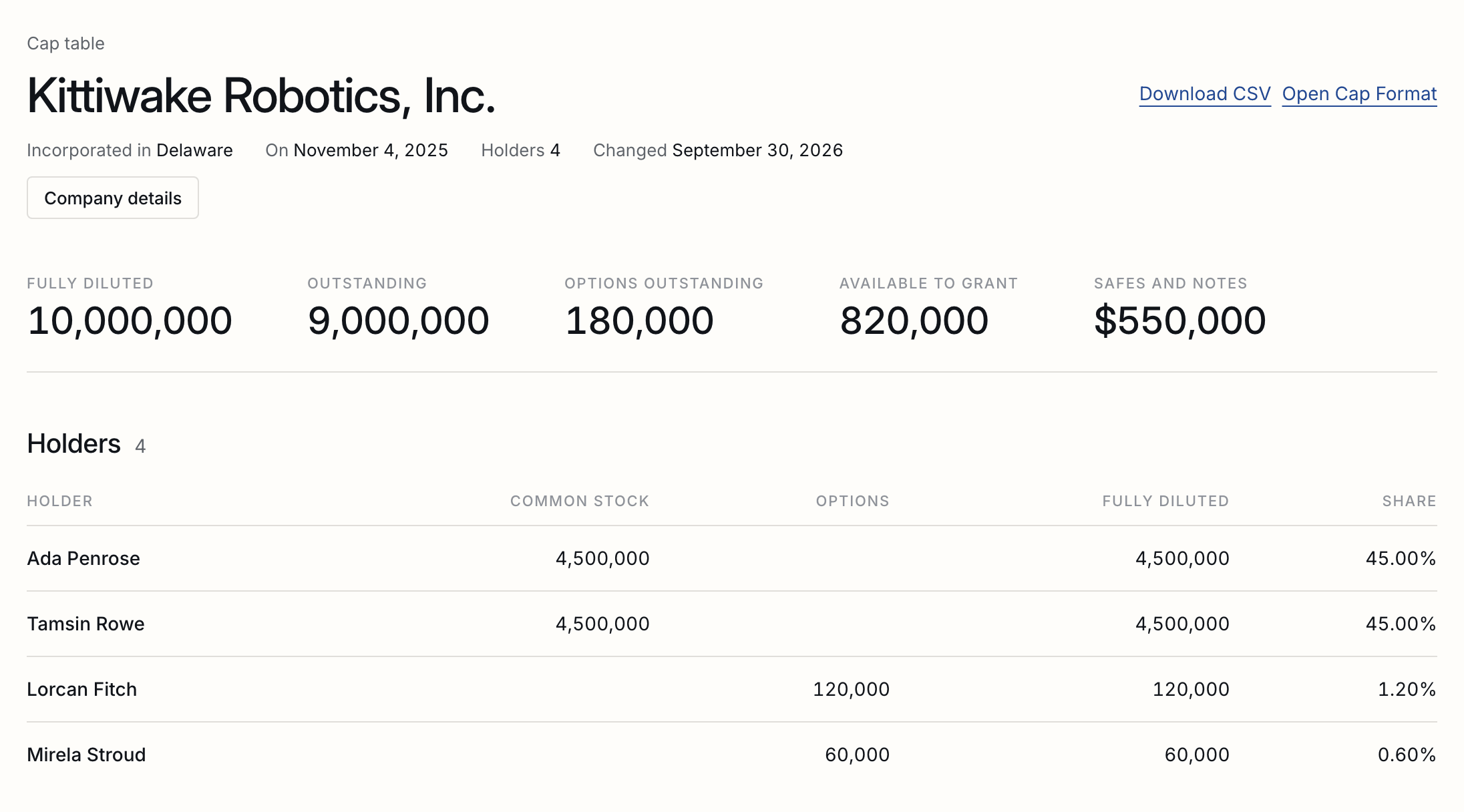
Who holds what in your company: shares by class, the option pool and its grants, and every SAFE and note, with the fully diluted table and each holder's share. The examples are for Kittiwake Robotics, Inc., a made-up Delaware company.
What it keeps
Classes, holders, shares issued, the option pool and its grants, SAFEs and notes, and a record of every change.
The cap table comes with every plan, Free included. If Cap table is not in your navigation, an owner or an admin can switch it on in Settings, Features. What your workspace shows
A cap table here is a record of the company’s equity: its share classes, who holds shares in each, the option plan and every grant from it, and the SAFEs and convertible notes waiting for a priced round. Every change is written to the table’s record with who made it and when, and nothing is deleted: shares that are repurchased, options that are cancelled and SAFEs that convert are marked so, on the day they were.
Starting one
The company's legal name and state; Common Stock is there from the start.
- Open Cap table in the navigation.
- Give the company’s legal name, its state of incorporation and, if you have it to hand, the day it was incorporated, then Start the cap table.
- Issue the founders’ shares. Common Stock is there from the start; add a preferred class when the company sells one.
Company details, under the title, changes the name, the state or the day of incorporation later; the change is recorded like every other.
A workspace can keep more than one company’s table, as a law firm or an accelerator does; the Cap table page then lists them.
The option pool
A plan reserves shares, grants take from it, and exercised and cancelled options are counted where they belong.
Add an option plan (the 2026 Stock Plan) with the shares it reserves, then Grant options from it: the holder, the number, the exercise price, the grant date, the expiry and the vesting. A grant larger than what the plan has left is refused with what is left.
| Exercised | Actions on the grant, then Exercise, with the shares and the date. They become the holder's shares in the plan's class. |
|---|---|
| Cancelled or expired | The options not yet exercised go back into the plan, ready to grant again. |
| Available to grant | What the plan reserves, less every exercised option and every unexercised option still in force. |
SAFEs and notes
Added by hand, or by themselves when a SAFE made here is signed by both, with the share a post-money SAFE buys.
A SAFE made from Y Combinator’s form in New document is added to the company’s cap table by itself once the company and the investor have both signed it, with its amount, its cap or discount, its date, and a link to the signed document. A company with no table yet gets one, named as the SAFE names it.
Any other SAFE or note is added by hand: Add a SAFE or note, then the holder, the amount, and its cap, discount or MFN; a note also takes its interest and maturity. A post-money SAFE with a cap shows the share of the company it buys: its amount over its cap, so $250,000 on a $10,000,000 cap is 2.50%. A SAFE with only a discount, or MFN, has no share to show until a priced round sets one.

How the numbers are worked out
Outstanding, options outstanding, available to grant, fully diluted, and each holder's share.
| Outstanding | Every share issued and still held, and every share bought by exercising options. |
|---|---|
| Options outstanding | Granted and not yet exercised, on grants still in force. |
| Available to grant | What each plan reserves and has not granted. |
| Fully diluted | Outstanding, options outstanding and available to grant, together. SAFEs and notes are listed beside it, not in it, because they are not shares until they convert. |
| A holder's share | Their shares and unexercised options, over the fully diluted total. |
A priced round, previewed
A pre-money valuation, new money and a pool: the price per share, how every SAFE converts, and who owns what after.
Under A priced round, give the pre-money valuation, the new money, and the share of the company the option pool should be after the round. The table below it shows, as you type, the price per share, the post-money valuation, the new investors’ shares, how far the pool is topped up, and each holder’s shares and share afterwards. Nothing is saved.
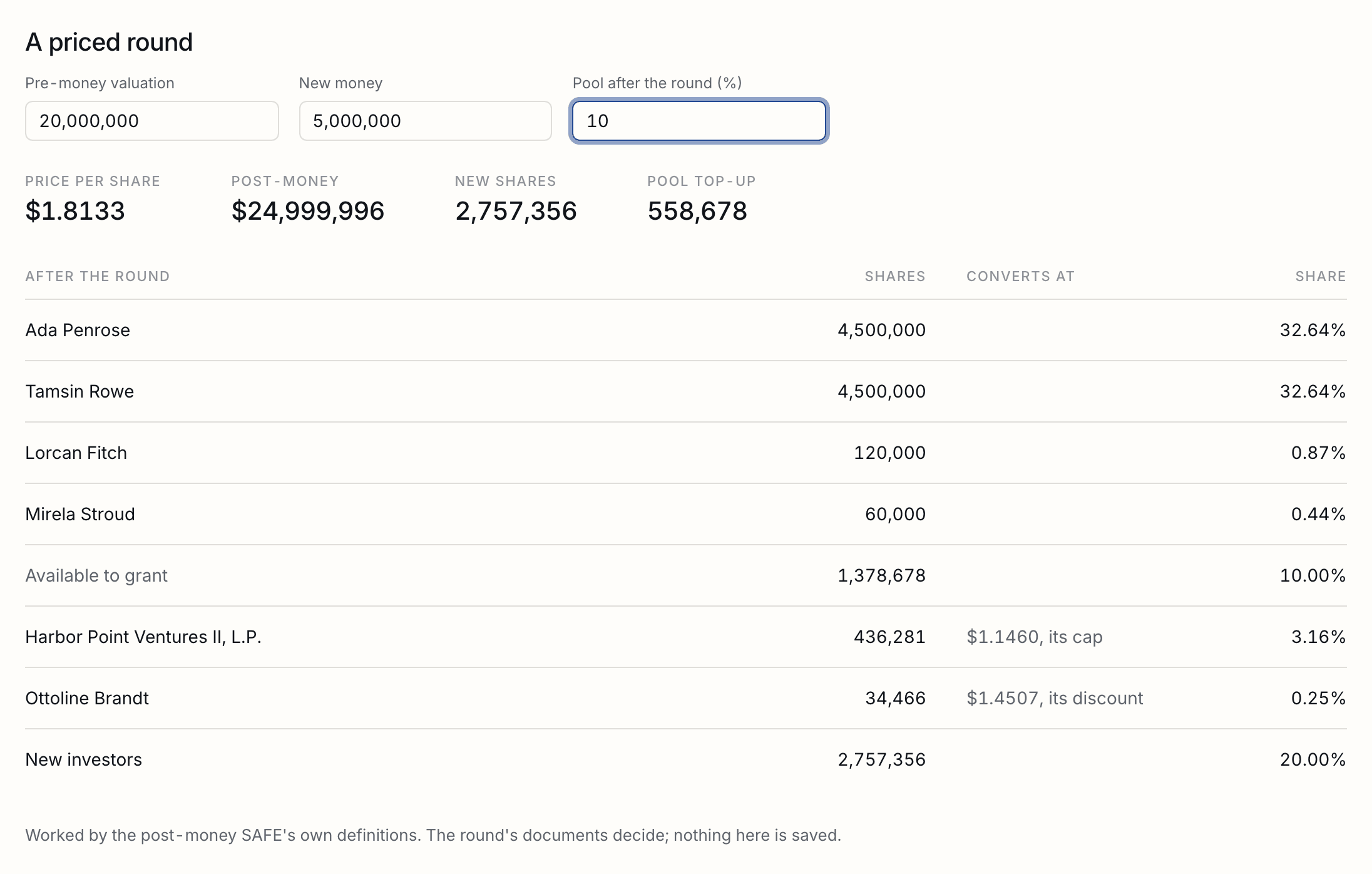
| A SAFE with a cap | Takes the greater number of shares: at the round's price, or at its Safe Price, the cap over the Company Capitalization, as the post-money SAFE defines them. The line says which. |
|---|---|
| A SAFE with a discount | Takes the round's price less its discount, when that is lower: 20% off a $2.00 price is $1.60. |
| An MFN SAFE | Converts at the round's price. |
| The pool's top-up | Added before the new money, so it is shared by the existing holders, as term sheets usually ask. |
| Example | $250,000 on a $10,000,000 cap is 2.50% of the company before the round; after $5,000,000 at $20,000,000 pre-money, with the pool left as it is, it is 2.00%, and the new investors hold 20%. |
In a data room
The cap table filed into a room as its spreadsheet, a draft until the room's keeper publishes it.
Put in a data room, at the top of the table, files it into a room of yours as its spreadsheet: into the room’s cap table folder when its index has one (the Raising Investment starting point’s Company and cap table), otherwise into a Cap table folder made for it. It is filed as a draft, so investors see it only when you publish it; in the room they read it as its values, marked with their own address like every other file.
Downloading it
A CSV of every holder, the pool, and every SAFE and note, for a spreadsheet or another cap table tool.
Download CSV, at the top of the table, gives every holder with their shares in each class, options, fully diluted shares and share; the lines for each plan’s pool; the totals; then every SAFE and note outstanding with its amount, cap, discount and share. It opens in Excel or Google Sheets, and other cap table tools read it as an import.
Open Cap Format, beside it, downloads the table as a zip of Open Cap Format files, the open standard for moving a cap table from one tool to another. They hold its history rather than its totals: every issue of shares with its vesting, every grant with its exercise price and vesting, each exercise on its own day, every SAFE and note with its cap, discount or interest, and each repurchase, cancellation, expiry and conversion on its date. Another tool that imports the format rebuilds the table from them.
The format asks for the day the company was incorporated, so the download appears once Company details has it.
Who sees it
The workspace's owners and admins, on every plan.
The workspace’s owners and admins keep the cap table: they see it and change it. Members and viewers are told who keeps it, since it says what every founder and employee holds. It comes with every plan, Free included.
Tell us what you were trying to do and we will fix the page. Write from the support page.
Last changed 30 September 2026.